














































Prompt Detail
Elegant Portrait Collage ChatGPT Image prompt
Copy Prompt
Copy the full prompt text to use it anywhere you like.
Copy was blocked by your browser. Select the prompt text below and copy it manually.
Choose image aspect ratio
Selected:Original keeps the saved wording. Choosing a ratio edits the copied text; also set the output size in your image tool.
Copy was blocked by your browser. Select the prompt text below and copy it manually.
Prompt guide
How to use this AI image prompt
Overview
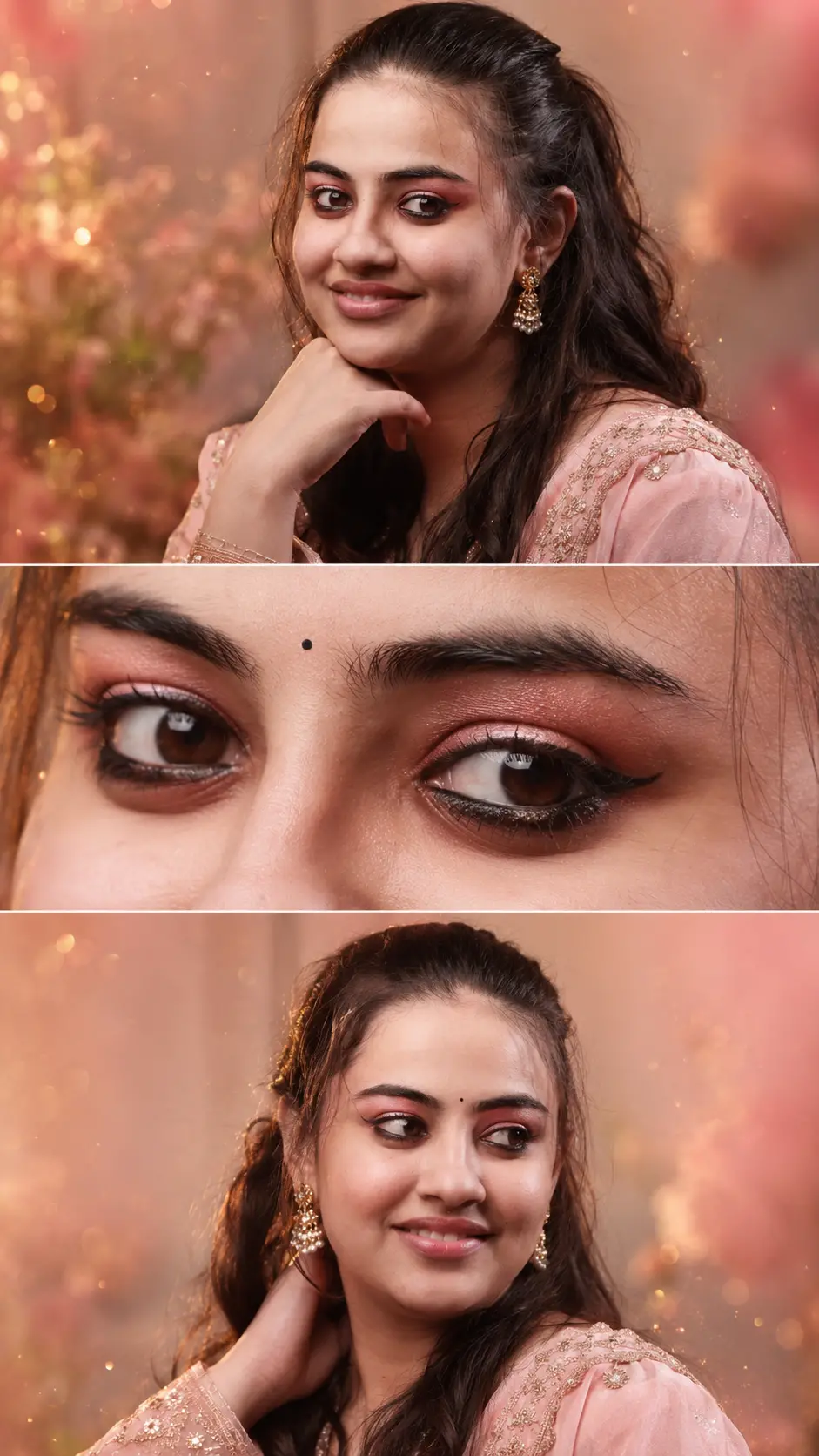
The Elegant Portrait Collage ChatGPT image prompt is designed to turn a personal reference photo into a polished vertical beauty editorial while keeping facial identity the highest priority. Its three-panel layout combines a direct close-up, an eye-focused crop, and a romantic three-quarter portrait. Consistent styling across the panels makes the result feel like one coordinated magazine photoshoot rather than three unrelated images.
The visual direction blends South Asian-inspired fashion with cinematic beauty photography. A blush-pink embroidered outfit, understated jewelry, delicate makeup, golden-hour illumination, floral blur, and champagne-toned highlights create a refined Bollywood editorial atmosphere. Realistic pores, individual hair strands, natural shadows, and an 85mm portrait-lens look help prevent the composition from appearing illustrated or overly filtered.
This AI image prompt is especially useful when identity consistency matters more than dramatic transformation. It can work as a ChatGPT image prompt, Gemini image prompt, or Gemini photo prompt, although each model may interpret facial references, panel divisions, hands, and fine details differently.
Best Use Cases
This prompt is suited to personal beauty editorials, social media portraits, celebration posts, digital keepsakes, profile features, and mood boards for traditional fashion photoshoots. The vertical 9:16 format is particularly practical for Stories, Reels covers, mobile wallpapers, and other portrait-first placements.
It is a strong choice for users who want subtle makeup and elevated styling without changing their recognizable features. Photographers, makeup artists, stylists, and creative directors can also use the concept to preview a coordinated pink-and-gold campaign before arranging a shoot.
As an AI photo editing prompt, it works best with a clear photo of the person whose appearance is being preserved. Use your own image or one you have permission to edit. The detailed identity instructions are helpful for reducing face drift, but no generative model can guarantee a perfectly identical face in every panel.
How to Customize This Prompt
Adjust only a few elements at a time so the model retains the prompt’s identity and composition priorities. Useful changes include:
- Replace blush pink with ivory, ruby, emerald, lavender, or champagne while keeping one wardrobe color across all panels.
- Change the traditional outfit details to match a saree blouse, anarkali, lehenga, or another South Asian-inspired style visible around the shoulders.
- Specify gold studs, crystal drops, pearls, or another small earring design that will not distract from the face.
- Shift the atmosphere from romantic golden hour to soft studio daylight, warm candlelight, or a cooler luxury editorial grade.
- Request a 4:5 layout for feed posts, but retain three horizontal panels and describe the intended crop clearly.
- Modify the expression from calm to gently smiling while asking the model to preserve the person’s natural mouth shape.
Avoid changing hairstyle, makeup intensity, pose, lighting, wardrobe, and aspect ratio in a single revision. Too many simultaneous edits can weaken identity consistency. If using this as a Gemini image prompt or another reference-based workflow, keep the original face-preservation language and revise the styling section only.
Tips for Better Results
The quality of the source photo has a major effect on the outcome. For more dependable results:
- Upload a sharp, well-lit, front-facing portrait with the eyes, hairline, jaw, and natural skin tone clearly visible.
- Avoid strong beauty filters, sunglasses, deep shadows, motion blur, or hair covering important facial features.
- Use one primary reference when the tool supports it; multiple photos with different makeup, ages, or hairstyles may create conflicting identity signals.
- Generate the full collage first, then correct individual panels through selective editing or inpainting if the platform provides those controls.
- Check the nose, eye spacing, jawline, hairline, and lip shape before focusing on sparkles, bokeh, or embroidery.
- Inspect hands and fingers closely, especially in the top and bottom poses. Simplify the hand position if repeated generations produce distorted anatomy.
- Ask for realistic texture rather than flawless skin. Excessive smoothing can remove distinctive features and make the face less recognizable.
- Keep the small bindi precisely centered and understated; oversized decorative elements may interfere with eyebrow or forehead details.
For stubborn face drift, generate one strong hero portrait before requesting the collage, then use that approved result as an additional visual guide where supported. This staged approach often gives an AI photo editing prompt clearer information about styling continuity.
What to Expect
A successful result should resemble a premium beauty-magazine collage with three clearly separated but softly blended photographs. Expect warm peach and pink tones, shallow depth of field, luminous hair edges, restrained gold accents, realistic skin, and consistent clothing and makeup. The middle eye crop should add visual drama without introducing a different eye shape or color.
Results will vary by model and its ability to follow reference images. Some systems may produce excellent atmosphere but imperfect panel consistency, while others may preserve the face well and simplify embroidery, particles, or lens effects. The best workflow is iterative: select the version with the most accurate identity, then refine layout and decorative details. Used carefully, this cinematic portrait prompt provides a clear creative direction for an elegant, recognizable, and cohesive South Asian beauty editorial.