Prompt Detail
Epic Celestial Creator Fantasy Portrait with Universe and Galaxies
Copy Prompt
Copy the full prompt text to use it anywhere you like.
Copy was blocked by your browser. Select the prompt text below and copy it manually.
Choose image aspect ratio
Selected:Original keeps the saved wording. Choosing a ratio edits the copied text; also set the output size in your image tool.
Copy was blocked by your browser. Select the prompt text below and copy it manually.
Prompt guide
How to use this AI image prompt
Overview
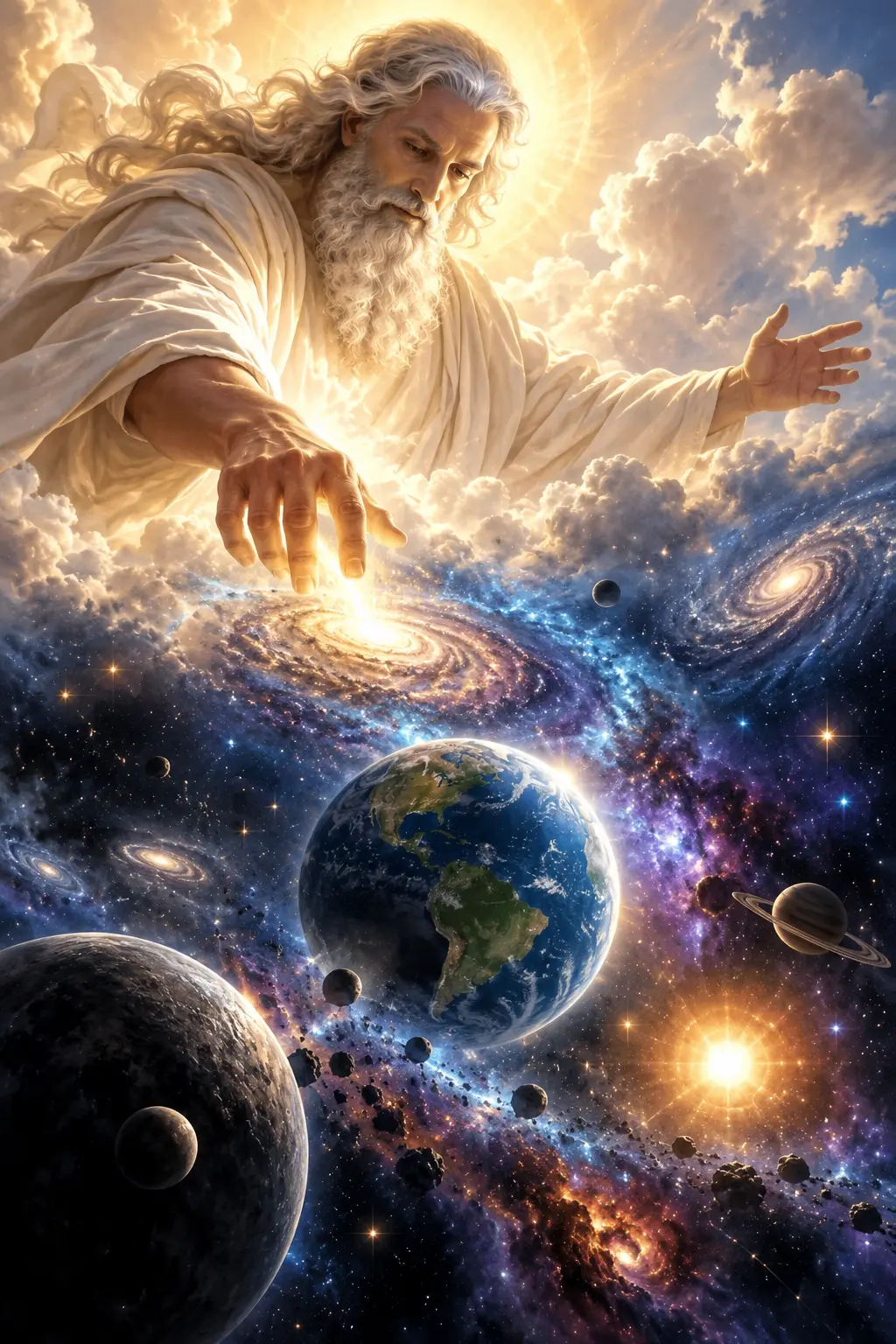
Creator and Creation in The Sky Potrait is an ambitious fantasy portrait concept that transforms an adult reference subject into a peaceful celestial figure bringing a universe into existence. The composition combines recognizable facial identity, monumental clouds, flowing ivory robes, golden backlighting, and a layered cosmic environment filled with galaxies, planets, nebulae, moons, and stars.
This AI image prompt is designed around a 9:16 vertical format, making it especially suitable for posters, mobile wallpapers, social media artwork, fantasy character presentations, and cinematic cover designs. The upper-half placement of the creator establishes authority, while the Earth-like planet and forming spiral galaxy below the extended hand create a clear visual story.
It can be used as a ChatGPT image prompt, Gemini image prompt, or Gemini photo prompt when the chosen tool supports reference-image guidance. It also functions as an AI photo editing prompt for turning a portrait into elaborate celestial fantasy art. Results will vary by model, particularly in facial resemblance, hand anatomy, and the number of small astronomical details rendered accurately.
Best Use Cases
This prompt is best for adults who want a personalized, photorealistic fantasy portrait rather than a generic celestial character. It is well suited to digital artists, photographers, content creators, fantasy enthusiasts, and designers producing dramatic spiritual or cosmic artwork. Always use a reference photo with the subject’s permission.
The concept works particularly well for inspirational posters, mythology-inspired portraits, commemorative artwork, album or book-cover concepts, and high-impact vertical posts. Its peaceful expression and protective open-arm pose can communicate creation, imagination, guardianship, power, or hope without depending on text within the image.
Because the scene requires realistic portraiture and complex visual effects at once, it is most effective in image models that support identity references, portrait orientation, and detailed lighting instructions. It is less suitable for small thumbnails, minimalist graphics, or projects that require scientifically exact planetary arrangements.
How to Customize This Prompt
Adjust a few focused details instead of rewriting every element. This helps preserve the central visual hierarchy and reduces conflicting instructions.
- Change the robe accents from warm gold to silver, pale blue, or violet to create a different celestial identity while retaining the ivory fabric.
- Specify whether the expression should appear serene, compassionate, solemn, or quietly powerful.
- Move the Earth-like planet slightly higher or lower depending on whether the final piece needs space for later graphic design.
- Replace the ringed planet with a glowing moon or rocky exoplanet while keeping the scene’s foreground, midground, and background depth.
- Increase the scale of the forming galaxy if the hand-to-creation interaction is more important than the surrounding universe.
- Select a 4:5 crop for a portrait post or retain 9:16 for a full-height poster and mobile display.
For a more photographic result, reduce the number of planets and emphasize skin, fabric, clouds, and one principal galaxy. For a more elaborate fantasy image prompt, preserve the broad cosmic environment but identify one dominant focal point beneath the hand.
Tips for Better Results
Use a sharp, evenly exposed reference photo showing the subject’s face without heavy filters. A front-facing or slightly angled portrait generally gives the model clearer information about facial structure, hair texture, skin tone, and age range.
- Generate the overall composition first, then refine the face and reaching hand with editing or inpainting tools if available.
- Keep the creator’s face, eyes, and nearest hand as the primary sharp areas. Excessive sharpness across every star and cloud can make the scene look flat.
- If fingers appear fused or duplicated, simplify the gesture and request a relaxed hand with five clearly separated fingers.
- Reduce bloom or golden glow when facial detail becomes washed out. Reflected cloud light should illuminate the face without removing natural shadows.
- If the background feels cluttered, remove minor moons and asteroid fragments before sacrificing the Earth-like planet or forming galaxy.
- Preserve realistic skin texture and restrained color grading to prevent the portrait from looking plastic or overly filtered.
When adapting this as an AI photo editing prompt, make changes in stages when possible: establish identity and pose, build the clouds and robes, and then refine cosmic objects and lighting. This staged workflow often provides more control than requesting every fine detail in one revision.
What to Expect
A strong result should show a recognizable adult subject emerging from immense illuminated clouds, with a natural downward gaze and a readable hand gesture directing energy into a bright spiral galaxy. The robes should have convincing folds and warm rim light, while the halo-like circle should appear to be made from light rather than a physical crown.
The finished scene should transition from luminous ivory and gold near the creator into deep blue, violet, magenta, and subtle orange in space. Foreground rocky planets, a detailed midground Earth-like world, and softer distant nebulae should establish cinematic scale.
Even advanced models may simplify tiny planets, produce inconsistent star patterns, or need extra passes for hands and exact facial resemblance. The most reliable approach is to judge identity, anatomy, lighting, and composition before evaluating minor cosmic detail. With careful reference selection and targeted refinement, this prompt can produce premium-looking celestial creator artwork with a dramatic, peaceful, and emotionally powerful fantasy style.