Prompt Detail
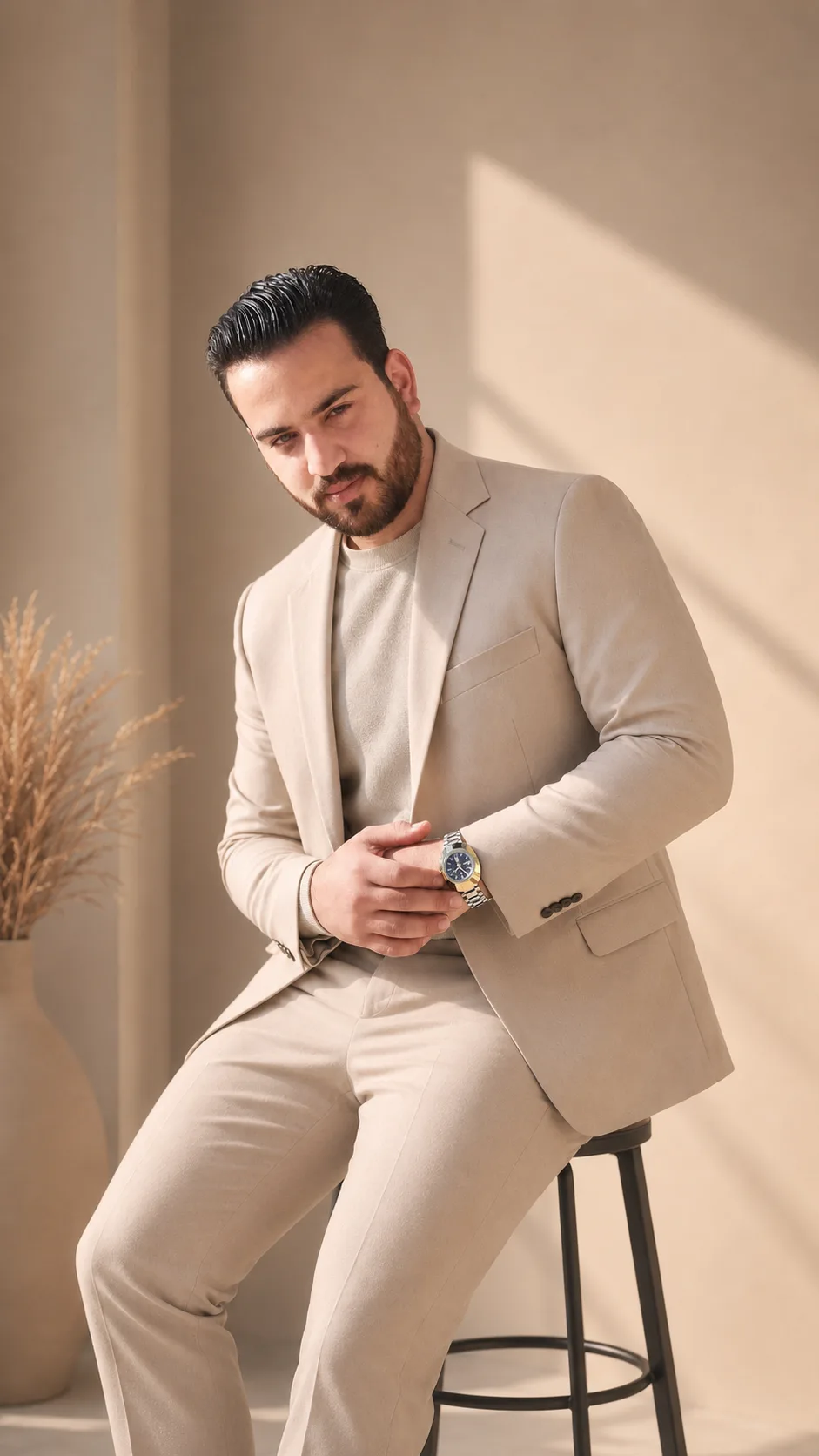
Opal Studio Portrait
Copy Prompt
Copy the full prompt text to use it anywhere you like.
Copy was blocked by your browser. Select the prompt text below and copy it manually.
Choose image aspect ratio
Selected:Original keeps the saved wording. Choosing a ratio edits the copied text; also set the output size in your image tool.
Copy was blocked by your browser. Select the prompt text below and copy it manually.
Prompt guide
How to use this AI image prompt
Overview
Opal Studio Portrait is designed to turn a person’s reference photo into a polished vertical studio portrait while keeping the subject recognizable. It prioritizes the original face, facial structure, skin tone, hairstyle, age, and natural body proportions. This makes it especially useful when identity accuracy matters more than dramatic transformation.
The visual direction combines flattering soft light with a clean, premium studio environment. A large diffused key light, gentle fill, and subtle rim lighting create natural facial highlights without harsh shadows. The softly illuminated background uses smooth gradients, restrained light patterns, and an atmospheric glow, allowing the person to remain the clear focal point.
This AI image prompt is built around a 9:16 composition suited to mobile screens and social media. It can be used as a ChatGPT image prompt, Gemini image prompt, or Gemini photo prompt when the selected tool supports reference-photo generation or editing. The intended result is contemporary and fashionable, with realistic skin, detailed fabric, balanced framing, and commercial portrait quality rather than a cartoon or heavily retouched appearance.
Best Use Cases
This prompt is a strong choice for people who want a refined profile portrait, creator image, social media post, personal branding visual, or fashion-focused studio photograph. The tall layout provides useful space above and below the subject, making the composition feel intentional on mobile platforms.
It is also suitable for photographers, designers, creators, and everyday users exploring soft light studio portrait ideas without building a physical lighting setup. As an AI photo editing prompt, it can help restyle an existing portrait with premium lighting and a minimal background while asking the model to retain recognizable identity details.
Use it when the source photo already shows the person clearly and the goal is enhancement rather than reinvention. The neutral or pastel wardrobe direction works well for a fresh, elegant look, while the uncluttered setting keeps attention on facial expression, hair, and clothing texture.
How to Customize This Prompt
The core instructions can be adapted without weakening the identity-preservation goal. Keep modifications specific and compatible with the soft, contemporary studio style.
- Choose an outfit direction within the requested neutral or pastel palette, such as an elegant neutral jacket, a soft pastel top, or a simple fashion-forward studio look.
- Refine the background by selecting a smooth neutral gradient, a softly illuminated pastel tone, or restrained light patterns.
- Adjust the crop for a closer head-and-shoulders portrait or a wider vertical composition, while retaining the 9:16 format and balanced spacing.
- Specify whether the atmosphere should feel brighter and fresher or softer and more subdued, but continue to avoid harsh contrast and overexposure.
- Emphasize realistic fabric texture, natural skin detail, or delicate hair highlights if one of those qualities is especially important.
When adapting this as a ChatGPT image prompt or Gemini image prompt, avoid adding conflicting requests such as dramatic hard light, a crowded location, or extreme facial retouching. Those changes work against the intended Trending Light studio finish.
Tips for Better Results
A clear reference photo gives the model better information for preserving facial structure, skin tone, hairstyle, age, and body proportions. Use a photo in which the face is visible, facial details are reasonably sharp, and the person is not heavily obscured.
- Keep identity instructions near the beginning so recognition remains the main priority.
- Request realistic skin texture rather than flawless or plastic-looking skin.
- Maintain the lighting hierarchy: diffused key light, delicate fill, and subtle rim light.
- Preserve negative space above and below the person so the tall portrait does not feel cramped.
- Keep the background minimal to prevent decorative elements from competing with the face.
- Retain the exclusions for distorted hands, extra fingers, duplicate limbs, blurred features, text, logos, and watermarks.
- If the first result changes the face or hairstyle, repeat the identity constraints and reduce unnecessary styling changes.
Different tools interpret a Gemini photo prompt or AI photo editing prompt differently. Generate more than one version when possible, then compare facial accuracy, hand anatomy, skin texture, lighting balance, and crop. Small revisions are usually more effective than adding many new visual concepts at once.
What to Expect
The expected result is a stylish single-person portrait with soft studio illumination, natural highlights, gentle shadows, and a smooth contemporary background. The face should appear sharp and recognizable, while the depth of field and atmospheric glow create separation without making the setting distracting.
Clothing should look elegant in neutral or pastel tones, with believable fabric texture and proportions. The final image should feel suitable for social media, mobile viewing, or polished personal presentation. Results will vary by model, especially in identity retention, hands, and fine texture. A capable reference-based generator should follow this AI image prompt more reliably, but occasional reruns or focused corrections may still be needed to achieve the desired Opal Studio Portrait finish.