
























































Prompt Detail
Stylish Man with 3D Caricature Bobblehead in Casual Outfit
Copy Prompt
Copy the full prompt text to use it anywhere you like.
Copy was blocked by your browser. Select the prompt text below and copy it manually.
Choose image aspect ratio
Selected:Original keeps the saved wording. Choosing a ratio edits the copied text; also set the output size in your image tool.
Copy was blocked by your browser. Select the prompt text below and copy it manually.
Prompt guide
How to use this AI image prompt
Overview
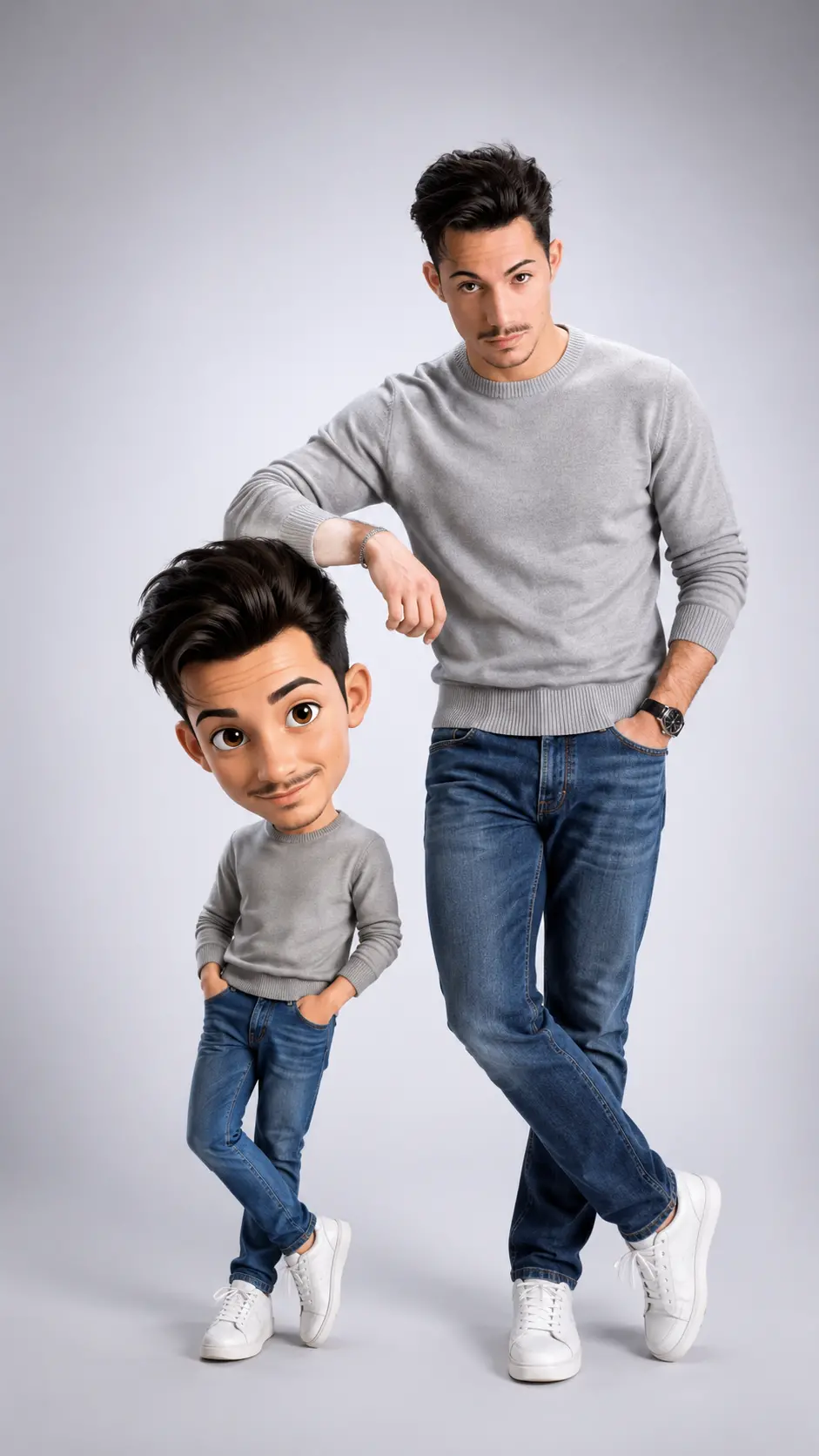
This prompt creates a polished 9:16 studio portrait that pairs a real man with a shorter, bobblehead-style 3D caricature of himself. The visual appeal comes from the contrast between an ultra-realistic full-body subject and a playful animated character with an oversized head, expressive eyes, and exaggerated proportions. Their interaction—one elbow resting casually on the caricature’s head—gives the composition personality while keeping it suitable for a premium portrait.
Identity preservation is central to the concept. The real subject should retain the facial structure, skin tone, hairstyle, proportions, and recognizable details shown in the reference. Meanwhile, the caricature translates those same features into a softer Pixar/Disney-inspired 3D style without losing the person’s likeness. A gray sweater, blue jeans, and white sneakers create an approachable casual-fashion look.
This can be used as a ChatGPT image prompt, Gemini image prompt, or general AI image prompt for models that accept reference images and vertical portrait instructions. It also works as an AI photo editing prompt when adapting an existing portrait into a realistic-and-cartoon studio composition.
Best Use Cases
This prompt is ideal for men who want a distinctive social profile image, personal-brand portrait, birthday visual, character reveal, or lighthearted fashion post. It can also help designers create paired human-and-avatar artwork for promotional graphics, creator announcements, or vertical story content.
The clean light-gray background and simple casual outfit make the result versatile. It is especially useful when the goal is playful rather than comedic: the real person remains confident and polished, while the 3D caricature introduces warmth and animation. The 9:16 framing is well suited to mobile-first layouts where both full-body figures need to remain clearly visible.
How to Customize This Prompt
Start with a sharp reference that clearly shows the subject’s face, hairstyle, skin tone, and overall appearance. Because the requested outfit is specific, a reference showing similar clothing can help the model interpret textures and fit more consistently.
Useful adjustments include:
- Change the expression from a relaxed smile to a broader grin while keeping facial identity intact.
- Refine the real subject’s stance by specifying how strongly the ankles cross or which arm rests on the caricature.
- Adjust the caricature height within the requested 50–60% range to make the size contrast stronger or subtler.
- Increase or reduce the character’s eye size, smile, or head proportions while preserving recognizable features.
- Make the gray sweater lighter or darker, but retain the fine knit, ribbed edges, straight blue jeans, and white sneakers if outfit consistency matters.
- Keep the background light gray, or fine-tune the gradient intensity without adding distracting objects.
For a Gemini photo prompt, place the identity-preservation instructions near the reference-image direction. This helps distinguish the photographic face from the intentionally stylized caricature face.
Tips for Better Results
Use a high-resolution reference with even lighting and minimal facial obstruction. Sunglasses, heavy shadows, extreme angles, or hair covering key features may make it harder to preserve likeness. A full-body reference can also improve clothing proportions and posture.
For stronger output quality:
- State clearly that only the caricature should be stylized; the real face must remain photographic and natural.
- Reinforce the left-right placement if the model swaps the subjects: caricature on the left, real person on the right.
- Request visible floor contact and soft grounding shadows to avoid floating feet or a figurine-like result.
- Keep the elbow contact natural. The arm should rest lightly on the oversized head without awkward bending or distorted hands.
- Preserve enough space above the real subject’s head and below both pairs of shoes for a balanced full-body crop.
- Ask for fine knit, denim, sneaker, skin, and soft 3D material detail rather than adding more background elements.
- If the first result appears stiff, emphasize loose shoulders, crossed ankles, asymmetrical weight, and lively movement in the smaller character.
Different image models interpret branded animation references and exact identity differently. If needed, describe the desired look as a polished family-animation-style 3D caricature with soft forms and cinematic rendering. This keeps the creative direction clear in either a ChatGPT image prompt or Gemini photo prompt without relying only on a style label.
What to Expect
A successful result should show a centered, full-body studio composition with a warm, confident man on the right and his animated 3D counterpart on the left. The real subject should appear naturally photographed, with realistic skin and clothing textures. The caricature should feel alive and expressive rather than like a rigid collectible.
Soft upper-left lighting should produce smooth highlights, gentle shadows, and clear separation from the light-gray seamless background. Expect the strongest images to balance accurate likeness, believable contact between the two figures, and a visible contrast between realism and cartoon styling. Exact facial fidelity, hand anatomy, character scale, and clothing details may vary by model, so selective revisions are often useful.