Prompt Detail
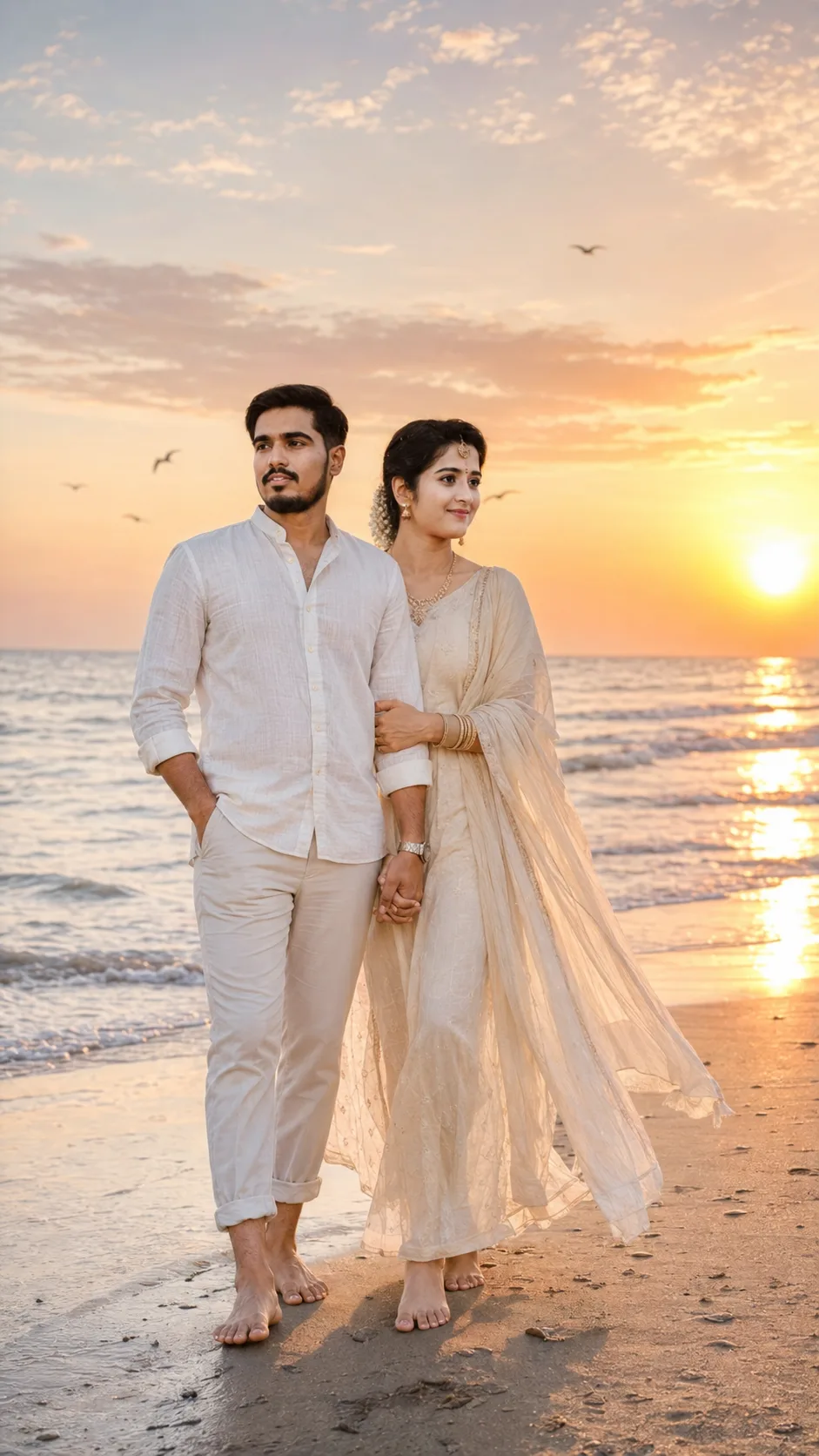
Sunset Beach Couple Love Story
Copy Prompt
Copy the full prompt text to use it anywhere you like.
Copy was blocked by your browser. Select the prompt text below and copy it manually.
Choose image aspect ratio
Selected:Original keeps the saved wording. Choosing a ratio edits the copied text; also set the output size in your image tool.
Copy was blocked by your browser. Select the prompt text below and copy it manually.
Prompt guide
How to use this AI image prompt
Overview
Sunset Beach Couple Love Story is a romantic portrait prompt designed to transform an uploaded couple photo into a realistic golden-hour beach scene. It prioritizes accurate identity preservation, asking the model to retain both people’s facial features, skin tones, hairstyles, ages, expressions, heights, and body proportions. This makes it especially useful when a generic romantic image is not enough and the finished portrait needs to remain recognizable.
The scene combines a peaceful shoreline, warm sunset reflections, pastel clouds, gentle waves, footprints, distant birds, and natural movement from a light sea breeze. Coordinated neutral outfits and cinematic rim lighting give the portrait an elegant travel-editorial quality without making it look overly staged.
You can use this as a ChatGPT image prompt, Gemini image prompt, Gemini photo prompt, or general AI image prompt for compatible image-generation and editing tools. Its vertical 9:16 composition is well suited to mobile viewing and story-style content. Because identity handling differs between models, treat the uploaded photo as a clear reference rather than expecting identical output from every platform.
Best Use Cases
This prompt is ideal for couples who want a polished romantic beach portrait without arranging a full sunset photo session. It can help create anniversary artwork, engagement-inspired portraits, vacation memories, social media stories, digital keepsakes, or personalized phone wallpapers.
Photographers and content creators can also use it to explore golden-hour couple portrait concepts before a real shoot. The details about lighting, clothing, movement, and pose provide a useful creative direction for mood boards or visual planning.
As an AI photo editing prompt, it works best when both people are already clearly visible in the reference image. It is particularly relevant for users searching for a realistic beach couple prompt, romantic sunset portrait prompt, or cinematic ocean love story image. Use reference photos only when you have the appropriate permission from the people shown.
How to Customize This Prompt
Start by deciding which romantic action should receive the most emphasis. Choosing one clear pose usually gives the model stronger direction than leaving several actions equally open.
- Select a specific moment, such as walking barefoot while holding hands, embracing near the water, or sharing a quiet candid glance.
- Adjust the outfit palette within the suggested cream, beige, pastel, or soft neutral range. For example, choose ivory and sand tones for an elegant look or pale blue and blush for a softer coastal mood.
- Refine the beach setting by emphasizing calm water, more visible sunset reflections, softer clouds, or a wider stretch of shoreline.
- Specify how close the framing should be. A full-body composition highlights bare feet and footprints, while a medium portrait gives more attention to faces and expressions.
- Modify the atmosphere with a subtle breeze, slightly stronger hair movement, calmer clothing, or more pronounced cinematic rim light.
- Keep the 9:16 format for stories and wallpapers, or change the aspect ratio only if your intended publishing platform requires another layout.
When adapting this into a Gemini photo prompt or another tool’s editing workflow, retain the identity-preservation instructions and the list of unwanted defects. Those constraints are central to the prompt’s realistic result.
Tips for Better Results
Choose a sharp reference photo in which both faces are unobstructed and naturally lit. Images with heavy filters, extreme angles, motion blur, or one person partially hidden may make accurate facial preservation more difficult. A reference that clearly shows relative height and body proportions can also support a more believable full-body portrait.
- Ask for one primary pose per generation to reduce confused limbs, awkward hand placement, or overlapping bodies.
- Keep hands visible but naturally positioned. Holding hands or using a gentle side embrace can be easier for an image model to interpret than complicated intertwined poses.
- Preserve realistic skin texture by avoiding instructions that imply excessive smoothing, glamour retouching, or artificial perfection.
- If colors appear too intense, reinforce warm natural light, soft pastel clouds, neutral clothing, and controlled saturation.
- If faces change, repeat the requirement to preserve each person separately and use the clearest available couple reference.
- Review fingers, facial symmetry, shoreline reflections, footprints, and duplicated background elements before accepting the final image.
- Generate several variations when possible. Small differences in pose, breeze, framing, and sunset intensity can significantly affect realism.
For a ChatGPT image prompt or Gemini image prompt, concise follow-up edits can be more effective than rebuilding everything. Request one correction at a time, such as improving hand anatomy, restoring a face, softening the sunset, or reducing lens glow.
What to Expect
The expected result is a vertical, realistic romantic portrait with the couple positioned naturally beside the ocean during golden hour. Warm backlighting should create a soft rim around their hair and clothing, while the water and sky add depth through reflections, waves, clouds, and distant details. Neutral coordinated clothing should keep attention on the couple rather than overpowering the scene.
Results will vary according to the model’s reference-image support, identity consistency, and ability to render hands and full-body poses. Strong tools may produce recognizable faces and convincing atmospheric lighting immediately, while others may need several generations or focused corrections. The most successful version should feel affectionate and cinematic while retaining natural expressions, believable anatomy, realistic skin, and a peaceful sunset beach atmosphere.