Prompt Detail
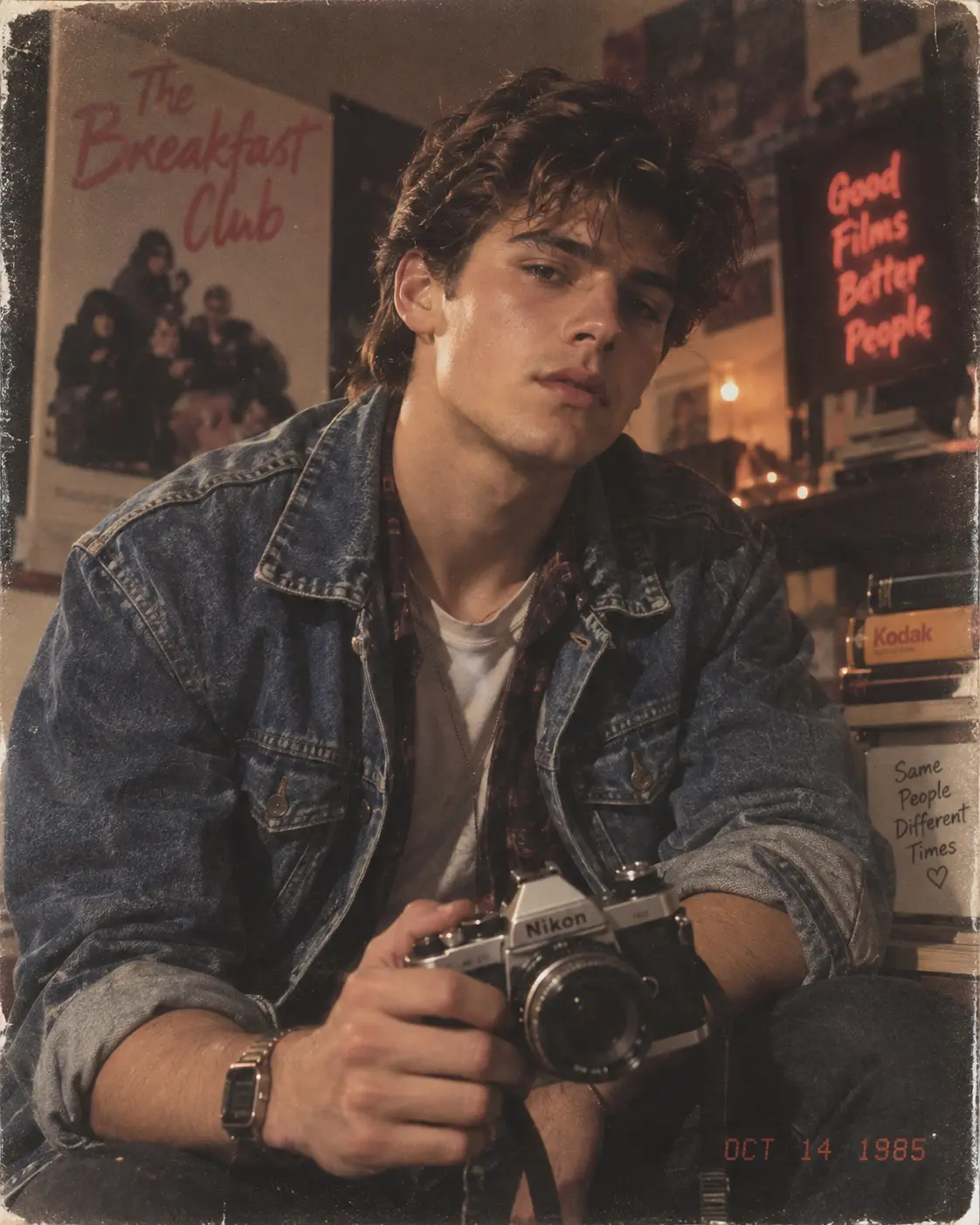
1980s Vintage Camera Portrait in Retro Room
Copy Prompt
Copy the full prompt text to use it anywhere you like.
Copy was blocked by your browser. Select the prompt text below and copy it manually.
Choose image aspect ratio
Selected:Original keeps the saved wording. Choosing a ratio edits the copied text; also set the output size in your image tool.
Copy was blocked by your browser. Select the prompt text below and copy it manually.
Prompt guide
How to use this AI image prompt
Overview
The 1980s Vintage Camera Portrait prompt is designed to transform a reference photo into a photorealistic editorial portrait with authentic mid-1980s character. It prioritizes recognizable facial identity while placing the subject in a nostalgic photography room filled with softly blurred analog equipment, film boxes, posters, books, VHS-style cases, and warm practical lighting.
The styling combines faded denim, layered casual clothing, a retro digital watch, and a silver-and-black 35mm SLR camera. Warm tungsten light, muted colors, shallow depth of field, subtle grain, and gentle analog softness help the result resemble restored premium color film rather than a modern photograph with a basic filter.
This detailed AI image prompt can work as a ChatGPT image prompt, Gemini image prompt, or Gemini photo prompt when the selected model supports reference-image editing. It is especially useful when facial resemblance, believable hands, accurate camera construction, and period-specific atmosphere all matter.
Best Use Cases
This prompt is ideal for young adult male portraits inspired by 1980s youth culture, independent filmmaking, analog photography, and vintage editorial imagery. It can create distinctive profile pictures, social media artwork, poster-style portraits, portfolio concepts, or nostalgic personal keepsakes.
Photographers and filmmakers can use the concept to visualize retro portrait sessions before sourcing clothing, props, and locations. Designers may also find it helpful for mood boards centered on warm film colors, denim fashion, creative bedrooms, or independent photography studios.
As an AI photo editing prompt, it is best suited to a clear reference photo where the face, hairstyle, skin tone, and distinctive features are visible. The identity-preservation instructions make it more appropriate for personalized results than prompts that generate a completely generic model.
How to Customize This Prompt
Adjust only a few elements at a time so the model retains the prompt’s strong visual direction and the subject remains recognizable.
- Change the clothing colors while keeping faded fabrics, rolled sleeves, layered shirts, and natural wear consistent with the 1980s aesthetic.
- Choose between a bedroom, photography studio, or independent film-lover’s room depending on the story you want the background to communicate.
- Increase the emphasis on photography accessories, books, film boxes, or VHS-style cases without introducing readable titles, logos, or brand names.
- Modify the expression from slightly serious to subtly thoughtful or relaxed while preserving direct eye contact and the gentle head tilt.
- Adjust the film treatment with warmer browns, more muted blues, lighter grain, or a softer vignette. Avoid heavy distress that obscures facial detail.
- Confirm the intended aspect ratio before generating. The supplied direction combines 9:16 with landscape composition, which can conflict. Use 9:16 for a tall vertical portrait or 16:9 for a wide landscape frame.
For a more intimate result, retain the close 50mm-lens perspective and waist-up framing. For added environmental storytelling, widen the composition slightly while keeping the person and camera dominant.
Tips for Better Results
A high-quality reference is the most important input. Use an evenly lit image with a visible face, natural skin detail, and minimal obstruction from sunglasses, hair, or extreme shadows.
- If resemblance is weak, simplify background details for the first generation and emphasize facial structure, hairstyle, age range, skin tone, and distinctive features.
- Inspect the eyes, fingers, camera grip, lens shape, strap attachment, and wristwatch. These complex areas are common sources of visual errors.
- Keep grain, dust, vignette, and analog softness restrained. The eyes, face, hands, and camera should remain sharp.
- Ask for a new variation if the room appears modern, the denim looks pristine, or the lighting feels flat. Period authenticity depends on materials, practical lights, and restrained color grading.
- Avoid adding famous camera brands, movie titles, or poster text. Generic period-appropriate props support the atmosphere without creating distracting lettering.
- When using this as a Gemini photo prompt or ChatGPT image prompt, follow the platform’s reference-image controls and compare several outputs rather than expecting every model to interpret identity strength identically.
The negative instructions are valuable, but adding even more restrictions can reduce consistency. Prioritize identity, anatomy, camera accuracy, lighting, and period décor.
What to Expect
A successful result should show one recognizable male subject seated close to the camera, leaning slightly forward and holding a believable vintage SLR. The face, eyes, hands, denim fibers, and metal camera surfaces should carry the strongest detail, while the room fades into warm cinematic bokeh.
Expect a palette of faded brown, muted blue, cream, amber, and orange, with soft tungsten highlights and gentle shadows. Subtle grain and aged-film texture should add character without making the portrait look damaged.
Results will vary by image model, reference-image support, and aspect-ratio handling. Strong models should preserve the editorial composition and nostalgic mood, but hands, camera mechanics, background text, and exact resemblance may require additional generations or targeted corrections. Used thoughtfully, this AI image prompt offers a practical foundation for an authentic 1980s vintage camera portrait with cinematic coolness and personal identity at its center.