Prompt Detail
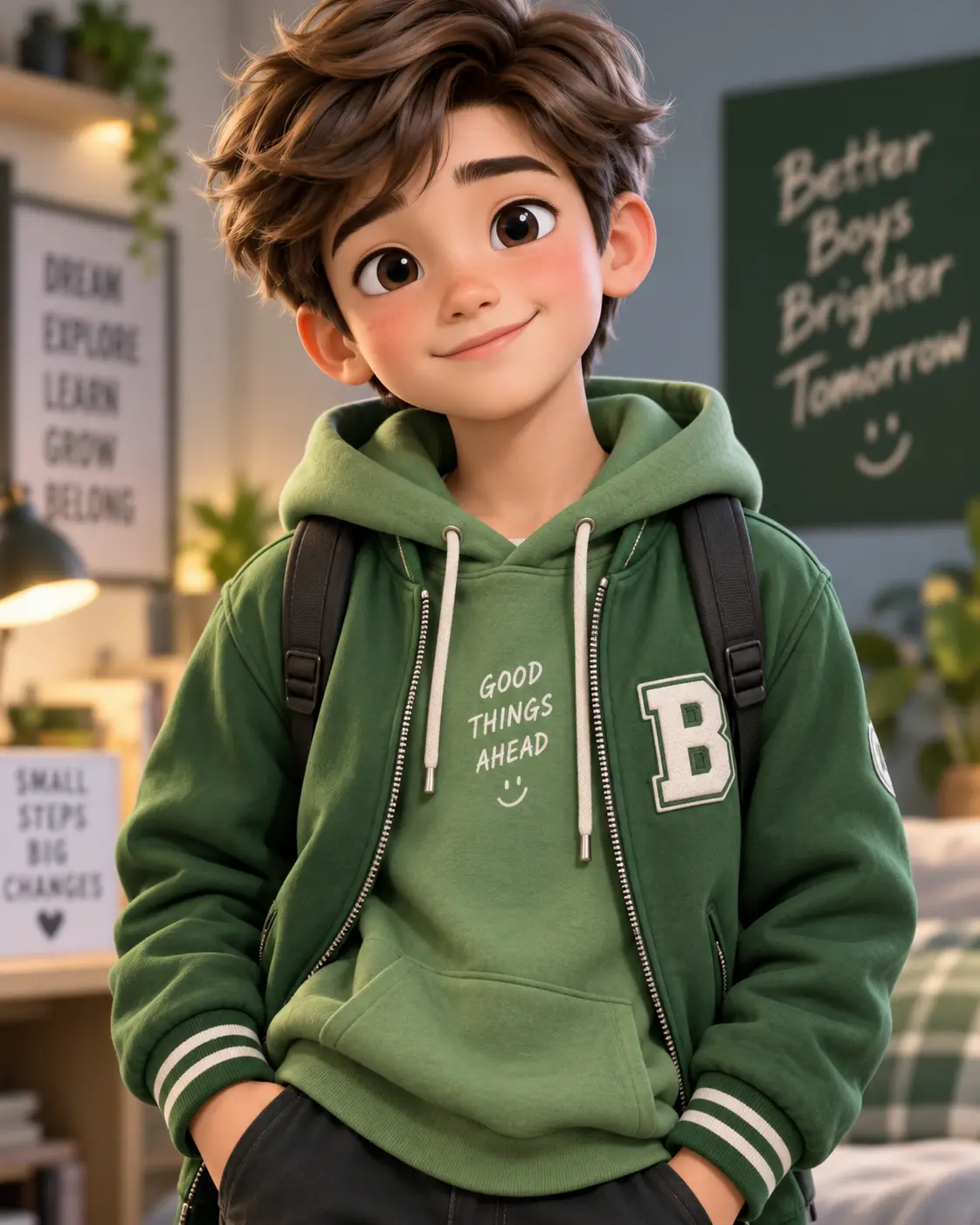
3D Animated Young Male Character Portrait in Casual Green Outfit
Copy Prompt
Copy the full prompt text to use it anywhere you like.
Copy was blocked by your browser. Select the prompt text below and copy it manually.
Choose image aspect ratio
Selected:Original keeps the saved wording. Choosing a ratio edits the copied text; also set the output size in your image tool.
Copy was blocked by your browser. Select the prompt text below and copy it manually.
Prompt guide
How to use this AI image prompt
Overview
The 3D Cartoon In Green Outfit Boy Portrait prompt turns a reference photo into a polished, waist-up 3D character portrait while prioritizing facial resemblance. It is designed to retain recognizable features such as face shape, skin tone, hairstyle, age range, and distinctive characteristics instead of producing a generic animated character.
Its art direction combines a sage hoodie, forest-green varsity jacket, dark trousers, and backpack with a warm bedroom or creative study setting. Cinematic lighting, detailed materials, shallow depth of field, and a vertical 9:16 composition give the result a premium character-animation finish. This AI image prompt can work as a ChatGPT image prompt, Gemini image prompt, or starting point for other reference-based image tools.
Best Use Cases
This prompt is useful for creating personalized social profile art, vertical story graphics, character posters, birthday artwork, modern avatars, or a stylized portrait for a creative portfolio. The friendly expression and cozy setting also make it suitable for wholesome lifestyle content and youth-oriented visual branding.
It is especially helpful for users who want a recognizable 3D cartoon transformation without losing the subject’s natural appearance. Designers and content creators can use it as a detailed Gemini photo prompt, while casual users can adapt it as an AI photo editing prompt for a single reference portrait.
The intended subject is male-presenting, with a relaxed youthful pose and fashionable green outfit. For best alignment with the concept, choose a source photo that clearly shows the face, hairstyle, and general age range.
How to Customize This Prompt
Adjust only a few elements at a time if identity preservation is the main goal. Large changes to the face, pose, wardrobe, and environment in one generation may reduce consistency.
- **Wardrobe:** Replace sage or forest green with another coordinated palette while retaining the layered hoodie-and-bomber structure. Specify fabric colors separately to avoid blended garments.
- **Expression:** Change the subtle smile to a neutral, cheerful, or thoughtful expression, but keep the eyes directed toward the camera for a strong portrait connection.
- **Setting:** Swap the bedroom-study environment for a neat studio, reading corner, or modern dorm room. Maintain warm practical lighting and an uncluttered background.
- **Framing:** Keep 9:16 for stories, mobile wallpapers, and vertical posters. Request a square crop for profile images, while preserving enough space around the hair and shoulders.
- **Stylization:** Increase realism for a cinematic 3D portrait or request softer, more playful character proportions. Avoid extreme head enlargement if accurate resemblance matters.
Tips for Better Results
A strong reference image is essential. Use a clear, well-lit photo with the full face visible and minimal obstruction from sunglasses, heavy shadows, hair, or motion blur. A front-facing or gentle three-quarter angle should support the requested eye-level composition.
- Keep identity instructions near the beginning of the prompt so the model treats resemblance as a priority rather than an optional style detail.
- If the first result looks generic, reinforce the subject’s specific face shape, hairstyle, eyebrows, and other visible characteristics without inventing new features.
- Check hands, eyes, jacket construction, zipper placement, and backpack straps carefully. These details are common failure points in complex 3D portrait generations.
- Preserve the negative instructions covering extra fingers, duplicate subjects, distorted anatomy, logos, readable wall text, watermarks, and plastic-looking skin.
- If the background competes with the face, request stronger depth of field, simpler shelving, and softer bokeh rather than removing the environment entirely.
- For a Gemini photo prompt or ChatGPT image prompt workflow, generate a few variations and refine one issue at a time. Models may interpret reference strength, materials, and lighting differently.
What to Expect
A successful result should show one centered male subject from around the waist up, wearing coordinated green layers and a visible black backpack. The face should remain the visual priority, with expressive eyes, detailed hair, natural-looking skin shading, and a friendly, confident expression.
Expect warm light from the front-left, gentle facial fill, a subtle rim light, realistic clothing shadows, and creamy background blur. The room should remain recognizable as a cozy modern bedroom or study without becoming cluttered. Fine stitching, metallic zipper highlights, fabric texture, and environmental bokeh should contribute to the premium finish.
Results will vary by model, reference quality, and image settings. Some tools may need separate correction passes for resemblance, hands, or unreadable décor. Used carefully, this AI photo editing prompt provides a strong foundation for a polished, cinematic 3D cartoon portrait rather than guaranteeing identical output across platforms.