









































Prompt Detail
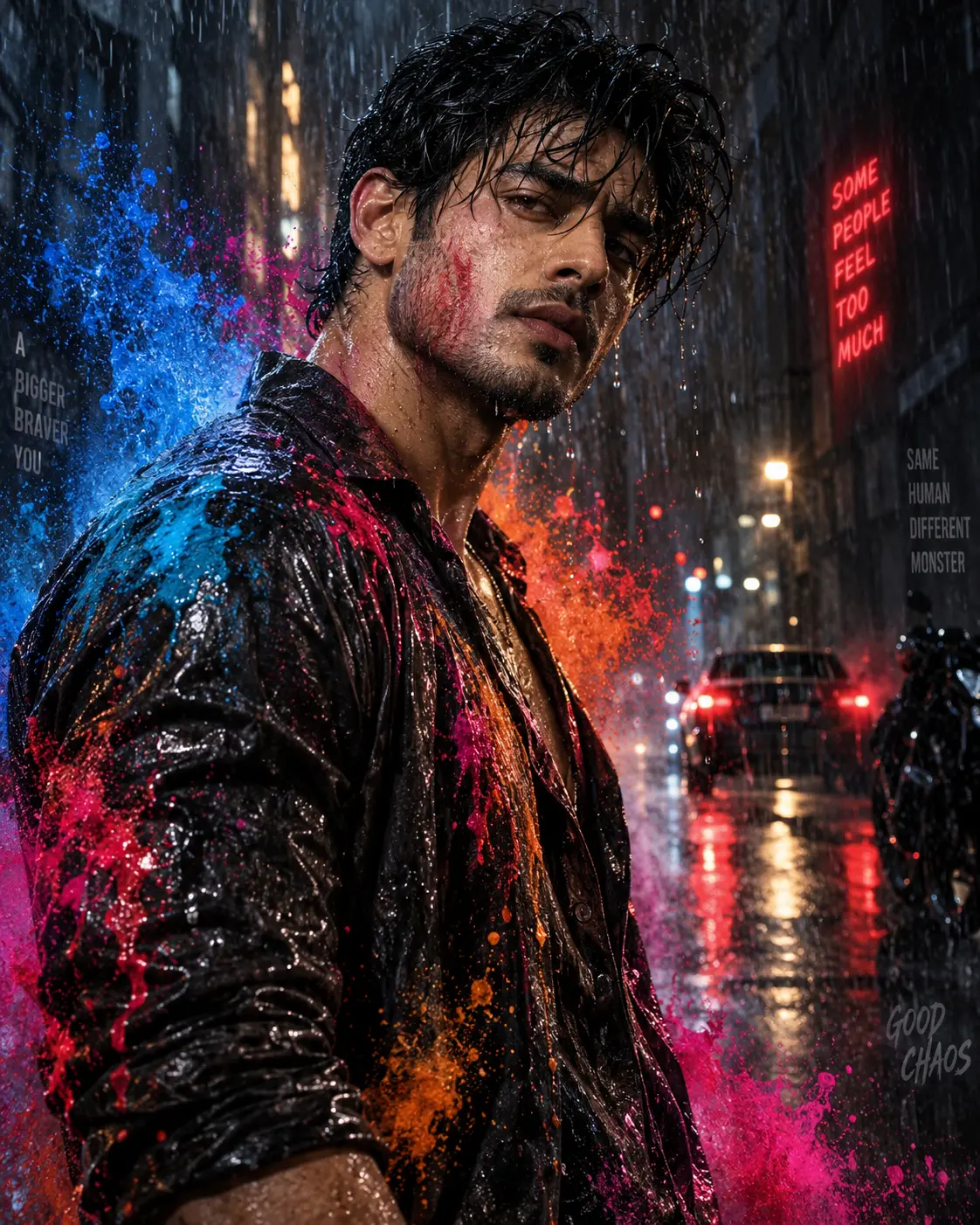
Cinematic Rainy Urban Portrait with Color Splash Effects
Copy Prompt
Copy the full prompt text to use it anywhere you like.
Copy was blocked by your browser. Select the prompt text below and copy it manually.
Choose image aspect ratio
Selected:Original keeps the saved wording. Choosing a ratio edits the copied text; also set the output size in your image tool.
Copy was blocked by your browser. Select the prompt text below and copy it manually.
Prompt guide
How to use this AI image prompt
Overview
Cinematic Rain Colour Splash Potrait is a detailed identity-preserving prompt for creating a photorealistic portrait of an adult man in a rain-soaked city at night. It combines dramatic movie-poster lighting, wet-street reflections, heavy rainfall, shallow depth of field, and frozen bursts of blue, magenta, orange, and red liquid pigment.
The composition places the subject in a three-quarter upper-body pose with direct eye contact and a controlled, self-assured expression. A dark wet jacket, blurred luxury-style car, glowing taillights, atmospheric mist, and layered rain contribute to the premium cinematic look. The reference photo remains central because the instructions prioritize recognizable facial structure, skin tone, hairstyle, age range, and distinctive features rather than substituting a generic model.
This can work as a ChatGPT image prompt, Gemini image prompt, or general AI image prompt for models that accept both text and reference images. It is especially useful when you want colorful action and dramatic lighting without sacrificing realistic skin, anatomy, or facial resemblance.
Best Use Cases
This prompt is well suited to cinematic profile portraits, social media artwork, music-cover concepts, character posters, personal branding, and dramatic editorial-style images. Its vertical framing and strong foreground subject can also work for mobile wallpapers, story graphics, reels covers, and poster mockups without typography.
It is designed for users who already have a clear reference portrait and want to transform its setting, wardrobe, lighting, and atmosphere. Photographers and designers can also use it as an AI photo editing prompt to explore rain effects, color treatments, or campaign concepts before arranging a practical shoot.
The concept is most effective for a single adult male subject. The restrained background, direct gaze, wet clothing, and suspended paint droplets make the result feel energetic while keeping attention on the face.
How to Customize This Prompt
Adjust only a few elements at a time if facial consistency is important. Large changes to pose, camera angle, hairstyle, and lighting in one generation may reduce resemblance.
- Change the splash palette to match a project, such as cyan and violet for a cooler mood or crimson and gold for a warmer result.
- Replace the black leather or satin-finish garment with another dark, rain-responsive fabric while retaining the open collar and reflective texture.
- Increase or reduce rainfall, mist, splash density, or background bokeh depending on whether you prefer realism or spectacle.
- Specify a closer head-and-shoulders crop when facial detail matters most, or widen the framing to reveal more pavement reflections and city atmosphere.
- Keep 9:16 for a vertical portrait. If you need a true landscape image, change the ratio to 16:9 and ask the model to preserve the subject’s foreground prominence.
- For a Gemini photo prompt, attach a sharp reference with the full face visible and clearly state that it is the primary identity source.
You can also soften the intense expression, adjust the head tilt, or change the balance between cool blue rim light and warm rear lighting. Avoid adding text or signs if you want the clean high-budget poster aesthetic described by the prompt.
Tips for Better Results
Use a high-quality reference photo with even facial visibility, natural proportions, and enough resolution to show the eyes, hairline, and skin texture. A heavily filtered or blurred source can make identity preservation less reliable. Use only a reference you have permission to use.
- Generate the portrait first, then inspect the eyes, jawline, nose, hairstyle, hands, and shoulder anatomy before refining secondary effects.
- If the face becomes too colorful, reduce pigment reflections on the skin while keeping stronger color on the jacket, droplets, and background.
- If the splashes look like smoke or flat graphics, emphasize dimensional liquid, impact physics, sharp individual droplets, and believable contact with rain.
- If skin appears plastic, reinforce visible pores, fine facial hair, subtle imperfections, restrained highlights, and minimal beauty filtering.
- Keep the car and urban structures heavily blurred so they support depth rather than compete with the subject.
- When using this as a ChatGPT image prompt or AI photo editing prompt, request one major correction per revision instead of rewriting every visual instruction.
Different generators interpret lens language, color grading, and identity guidance differently. If an initial result is oversaturated, reduce magenta and orange intensity before lowering the overall contrast. If rain hides the face, ask for fewer foreground streaks across the eyes while retaining heavy rainfall elsewhere.
What to Expect
A strong result should resemble a polished cinematic still: a sharply focused male subject, realistic wet hair and skin, glossy dark clothing, sculpted shadows, and vivid liquid color frozen around the body. The background should remain soft, with red taillights and warm street reflections adding depth behind the cool facial light.
This Gemini image prompt aims for realistic portrait-lens compression, strong separation, atmospheric rain layers, and a bold cyan-magenta-orange grade. Results will vary by model, reference quality, aspect-ratio support, and identity-preservation capability. Some generators may require several passes to balance accurate facial resemblance with complex rain, lighting, and splash physics. Prioritize the face first, then refine droplets, fabric reflections, and background details for the most convincing final image.