Prompt Detail
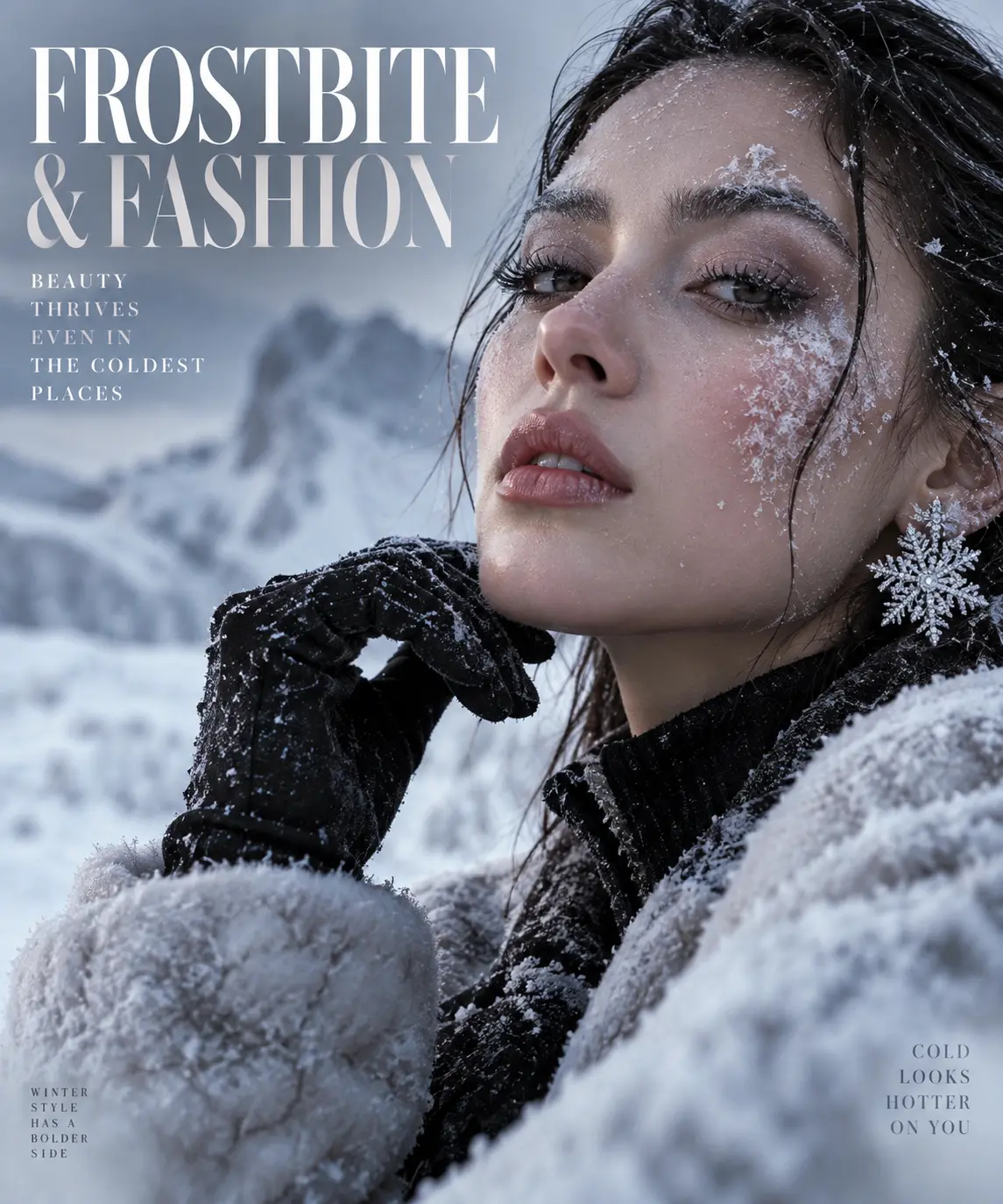
Winter Fashion Editorial Potrait with Snow and Frost
Copy Prompt
Copy the full prompt text to use it anywhere you like.
Copy was blocked by your browser. Select the prompt text below and copy it manually.
Choose image aspect ratio
Selected:Original keeps the saved wording. Choosing a ratio edits the copied text; also set the output size in your image tool.
Copy was blocked by your browser. Select the prompt text below and copy it manually.
Prompt guide
How to use this AI image prompt
Overview
Frostbite and Fashion Potrait is a reference-based AI image prompt for creating a photorealistic luxury winter editorial while preserving the adult subject’s recognizable identity. It combines alpine scenery, refined cold-weather styling, cinematic daylight, and close portrait framing. The intended result resembles a premium fashion campaign photographed at an exclusive ski resort rather than a casual winter snapshot.
The composition places the subject prominently on the right, with softly blurred mountain peaks, snowy slopes, and subtle lodge architecture behind them. An elegant black coat, white faux-fur trim, cream knitted turtleneck, gloves, and ski goggles establish a sophisticated visual hierarchy. Fine snow crystals and cold-weather blush add environmental realism without hiding important facial details.
This can be used as a ChatGPT image prompt, Gemini image prompt, or adaptable AI image prompt in tools that accept a reference photo. It is especially useful when the goal is to retain facial structure, skin tone, hairstyle, age range, and distinctive features while transforming the setting, wardrobe, lighting, and editorial mood.
Best Use Cases
This prompt is well suited to luxury winter campaign concepts, personal fashion portraits, seasonal social media artwork, creative portfolio pieces, ski-resort promotions, and cinematic profile images. Photographers and art directors can use it to visualize a cold-weather editorial before arranging a real production. Individuals can use it to reinterpret a clear portrait as an aspirational alpine fashion photograph.
It is also practical as a Gemini photo prompt for creators who need specific direction on pose, lens character, lighting, clothing texture, and background separation. The detailed identity instructions make it particularly relevant for portrait transformations in which a generic replacement face would undermine the result.
Because the requested format is vertical 9:16, the image can work effectively for Stories, Reels covers, mobile campaign mockups, or portrait-oriented digital displays. The right-weighted subject placement may also leave useful background space on the left, although the generated image itself should remain free of text and branding.
How to Customize This Prompt
Begin with a sharp, well-lit reference image showing the face clearly. A front-facing or gently angled portrait generally provides more reliable identity cues than a distant image, dramatic profile, heavy filter, or photograph with obscured facial features.
Useful adjustments include:
- Change the coat from black to charcoal while retaining strong contrast against the white fur and snow.
- Specify short, long, curly, braided, or tied-back hair only when that treatment remains consistent with the reference identity.
- Adjust the expression from slightly intense to serene, confident, or quietly glamorous.
- Move the hand from the chin to the coat collar if the model struggles with finger anatomy.
- Replace bright daylight with overcast alpine light for a softer, more muted editorial result.
- Request lighter or heavier snowfall, but keep particles away from the eyes, nose, and mouth.
- Change the crop to head-and-shoulders for stronger facial emphasis or chest-up for more visible wardrobe detail.
When adapting this as an AI photo editing prompt, separate nonnegotiable details from creative ones. Identity, realistic anatomy, eye focus, and skin texture should remain fixed. Wardrobe color, snowfall, background architecture, pose, and grading can be treated as flexible styling choices.
Tips for Better Results
Reference quality has a major effect on facial resemblance. Use one clear adult portrait without sunglasses, motion blur, harsh beauty filters, or extreme shadows. If the platform supports image influence or reference strength, start at a moderately high identity setting, then reduce it slightly if the output becomes rigid or copies unwanted elements from the original background.
For more dependable results:
- Generate several variations and compare the eyes, jawline, nose, hairline, and face shape before selecting an image.
- Keep the 85mm portrait-lens direction for flattering proportions and creamy background separation.
- Preserve the upper-left key light so highlights, shadows, rim light, and snow reflections remain visually consistent.
- Ask for natural skin pores and restrained makeup to avoid waxy skin or excessive beauty retouching.
- Reduce frost effects if crystals begin to alter the eyebrows, eyelashes, or facial outline.
- Simplify the hand pose or crop slightly tighter when extra, fused, or malformed fingers persist.
- Retain cool shadows, realistic whites, and rich blacks rather than pushing the entire scene toward saturated blue.
Different generators interpret long instructions differently. A ChatGPT image prompt may follow conversational refinements effectively, while a Gemini photo prompt may benefit from restating the most important identity and composition requirements during revisions. Do not assume identical framing, likeness, fabric detail, or snow behavior across models. Evaluate each output at full size, especially around the eyes, hands, goggles, fur edges, and background people.
What to Expect
A successful result should show one recognizable adult subject in a polished chest-up winter portrait with direct eye contact, a poised expression, and believable cold-weather detail. Expect crisp eyes, luminous natural light, visible fabric texture, delicate snow crystals, and shallow depth of field separating the subject from an upscale alpine environment.
The overall palette should remain icy and restrained, balancing blue-gray atmosphere with natural skin tones, white snow, and dark clothing. The visual mood should feel glamorous, powerful, and expensive without becoming overly sporty or artificial.
Results may still require iteration. Facial resemblance, hand anatomy, falling snow, and small reflections are common areas to inspect. Use follow-up edits that address one issue at a time—for example, correcting the hand while preserving the face and composition. With a strong reference and controlled revisions, this AI image prompt can produce a convincing luxury winter fashion portrait suitable for professional-looking creative use.