

























Prompt Detail
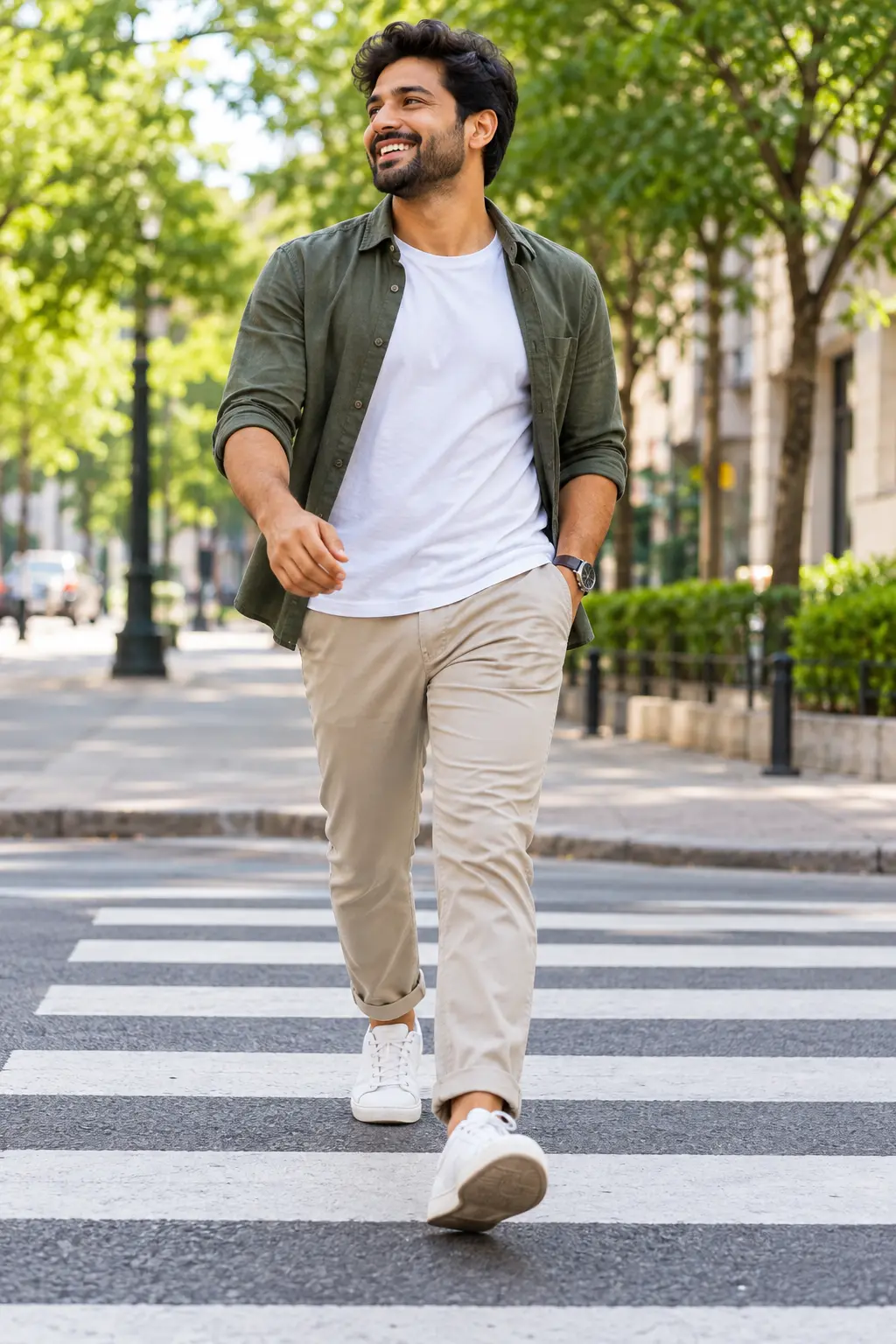
Casual Urban Male Lifestyle Full-Body Portrait Walking on Crosswalk
Copy Prompt
Copy the full prompt text to use it anywhere you like.
Copy was blocked by your browser. Select the prompt text below and copy it manually.
Choose image aspect ratio
Selected:Original keeps the saved wording. Choosing a ratio edits the copied text; also set the output size in your image tool.
Copy was blocked by your browser. Select the prompt text below and copy it manually.
Prompt guide
How to use this AI image prompt
Overview
Joy Cross walk Stroll Men Potrait is a detailed identity-preserving AI image prompt for creating a photorealistic, full-body portrait of an adult man enjoying a sunny city walk. It uses an uploaded reference as the subject guide while changing the pose, wardrobe, lighting, camera perspective, and urban environment. The intended result is a cheerful editorial lifestyle photograph rather than a formal studio portrait.
The composition places the man mid-stride on a bold zebra crossing, dressed in an olive overshirt, white T-shirt, beige chinos, and white sneakers. Natural sunlight, mature trees, neutral city buildings, and softly blurred traffic create an optimistic setting. A broad smile and relaxed body language communicate confidence, freedom, and everyday joy.
This can work as a ChatGPT image prompt, Gemini image prompt, or general AI image prompt when the chosen model supports reference images. It is especially useful for people who want recognizable facial features combined with polished commercial photography, realistic clothing, and a vertical 9:16 composition.
Best Use Cases
This prompt is suited to personal branding portraits, social media posts, profile features, lifestyle campaigns, fashion inspiration, and upbeat editorial content. Its vertical framing is practical for Stories, Reels covers, mobile advertisements, Pinterest posts, and portrait-oriented website banners.
It is a strong choice for adult men who want a friendly outdoor portrait without appearing overly posed. Photographers, creators, small businesses, stylists, and marketing teams can use it to visualize a smart-casual campaign or develop a reference for a real photo shoot.
As a Gemini photo prompt, it can help turn an ordinary reference portrait into a more cinematic environmental scene. It may also serve as an AI photo editing prompt when the goal is to retain the person while replacing the outfit, pose, or background. Only use a reference photo you have permission to upload and edit.
How to Customize This Prompt
Begin with a clear reference image showing the face without heavy filters, sunglasses, or strong shadows. Identity consistency is usually better when the facial features, hairstyle, and skin tone are easy for the model to interpret.
Useful customizations include:
- Change the olive overshirt to navy, rust, cream, or another color that suits the subject while keeping the smart-casual styling.
- Replace the neutral city setting with a business district, leafy residential avenue, modern plaza, or historic street.
- Adjust the expression from a broad smile to a subtle smile if a calmer personal-branding result is preferred.
- Change the time of day to golden hour for warmer light or overcast daylight for softer contrast.
- Select a 4:5 ratio for a feed post while retaining 9:16 for mobile-first content.
- Modify the wristwatch, shoes, or chinos carefully without adding visible brand logos.
Keep identity instructions near the beginning of the prompt. For a portrait-focused ChatGPT image prompt, avoid changing too many facial, hair, age, and styling variables in one generation. Large simultaneous changes can make resemblance less reliable.
Tips for Better Results
Reference-image quality matters more than adding exaggerated detail words. Choose a sharp, recent photo with a natural expression and accurate color. A front or three-quarter facial angle generally provides more useful identity information than a distant full-body image.
For more dependable generations:
- Ask for one subject only and keep crowds out of the immediate foreground.
- Confirm that the complete head, hands, legs, and shoes remain inside the frame.
- Preserve the mid-stride action, but regenerate if the feet overlap unnaturally or the walking balance looks awkward.
- Inspect the eyes, smile, fingers, watch, trouser pocket, shoe shape, shadows, and crossing stripes at full size.
- Use moderate background blur so the urban setting remains recognizable without competing with the face.
- Reduce terms such as “ultra-detailed” if a model produces oversharpened skin, excessive HDR, or artificial textures.
Different image models interpret negative instructions and reference strength differently. If resemblance is weak, simplify the scene, restate the essential facial traits, or increase reference influence where that control is available. If the face looks correct but the anatomy fails, keep the successful image and use localized editing for hands, feet, or clothing. This workflow often makes an AI photo editing prompt more effective than repeatedly rebuilding the entire scene.
What to Expect
A successful result should resemble premium commercial lifestyle photography: one recognizable man centered on a tree-lined crossing, captured in a relaxed walking pose with a genuine smile. Expect warm skin highlights, soft pavement shadows, realistic cotton folds, clean sneaker detail, leafy bokeh, and enough architectural context to establish a refined city environment.
The 50mm-style perspective should feel natural rather than dramatically wide, while the slightly low viewpoint adds confidence and movement. The final image should have balanced greens, beige and white clothing tones, realistic saturation, and a polished editorial finish.
Exact identity, anatomy, fabric detail, and background geometry can vary between models and generations. Review outputs carefully, especially when using Gemini image prompt tools or other reference-based systems. Several attempts or targeted corrections may be needed to achieve the strongest combination of likeness, natural motion, and photorealism.