Prompt Detail
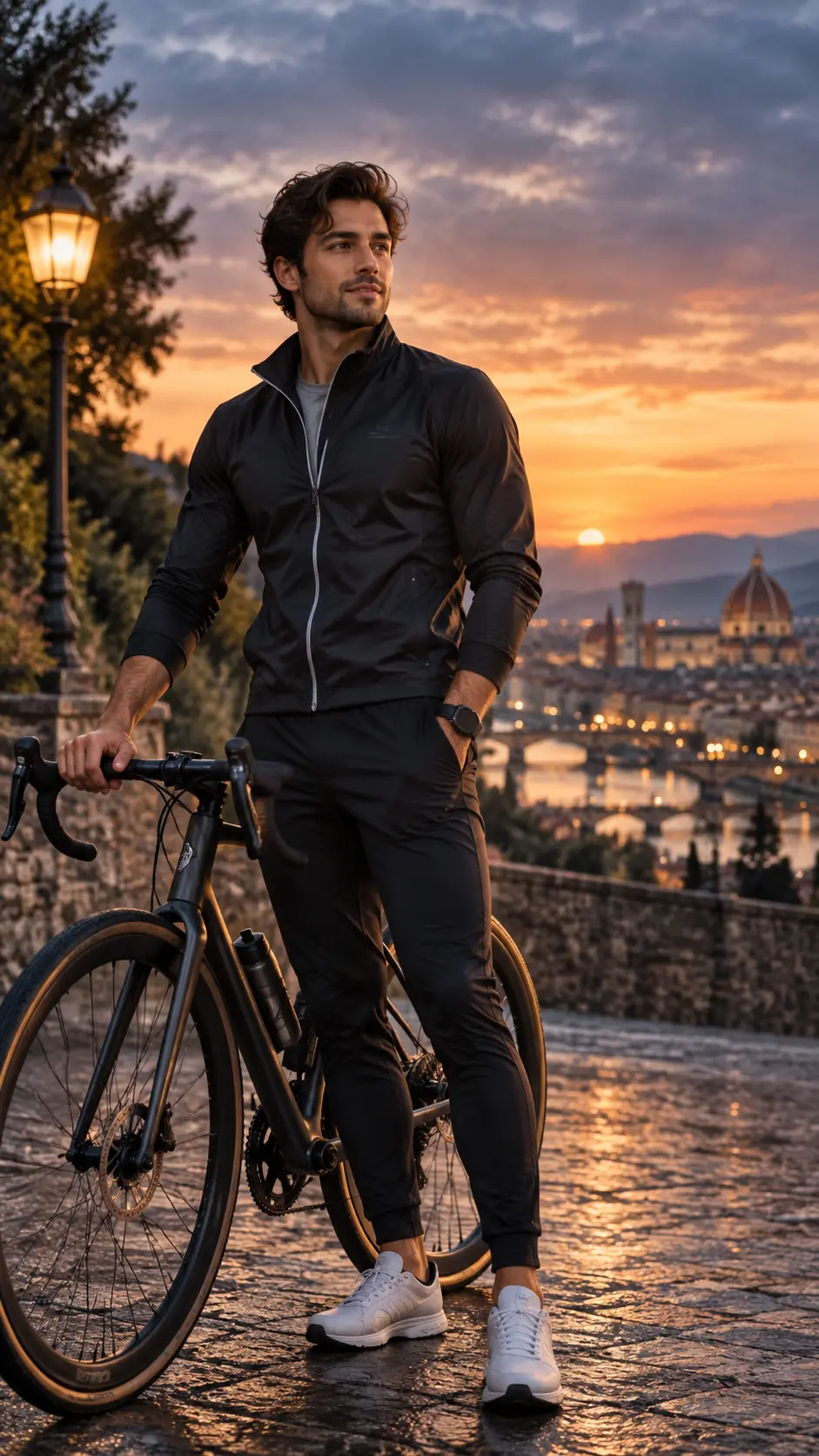
Photorealistic Urban Cycling Portrait with Matte Black Road Bicycle
Copy Prompt
Copy the full prompt text to use it anywhere you like.
Copy was blocked by your browser. Select the prompt text below and copy it manually.
Choose image aspect ratio
Selected:Original keeps the saved wording. Choosing a ratio edits the copied text; also set the output size in your image tool.
Copy was blocked by your browser. Select the prompt text below and copy it manually.
Prompt guide
How to use this AI image prompt
Overview
The Cinematic Bicycle Rider Portrait prompt is designed to transform a reference photo into a polished, full-body cycling portrait while preserving the subject’s recognizable identity. It combines luxury fashion styling, realistic bicycle details, and a dramatic European city overlook at golden hour. The intended result resembles a premium outdoor cycling campaign rather than a casual snapshot.
This AI image prompt gives detailed direction for pose, wardrobe, lighting, environment, camera perspective, and color grading. The subject stands beside a matte-black road or gravel bicycle, wearing understated black performance clothing and white sneakers. Wet stone, a glowing streetlamp, historic architecture, a river, and a domed cathedral add cinematic depth without taking attention away from the rider.
It can be used as a ChatGPT image prompt, Gemini image prompt, or Gemini photo prompt when the chosen tool supports reference-image guidance. It is especially useful when users want an aspirational editorial portrait with natural skin, accurate anatomy, realistic materials, and sophisticated sunset lighting.
Best Use Cases
This prompt is well suited to cyclists, creators, fashion enthusiasts, and professionals who want a refined portrait built around an existing personal photo. It can create a luxury-style profile image, social media feature, cycling campaign concept, personal branding visual, or editorial poster composition.
Cycling brands and creative teams can use the concept for visual direction before arranging a real photoshoot. The logo-free wardrobe and premium bicycle styling make it adaptable for commercial mockups, mood boards, and campaign presentations. Individuals can also use it as an AI photo editing prompt to place themselves in a cinematic travel setting while retaining their facial structure, hairstyle, skin tone, and general appearance.
The vertical 9:16 format is particularly practical for Stories, Reels covers, mobile wallpapers, and portrait-oriented promotional artwork. Its calm, adventurous mood also works well for lifestyle content focused on travel, performance, confidence, or understated luxury fashion.
How to Customize This Prompt
Keep the identity-preservation instructions intact when accurate facial resemblance is important. Customize only a few major elements at a time so the model can maintain a coherent scene.
- Change the clothing colors while retaining fitted, logo-free athletic styling. Charcoal, deep navy, muted olive, or dark brown can preserve the premium mood.
- Adjust the city atmosphere by emphasizing the river, cathedral, bridges, hills, or mountains already included in the setting.
- Choose a stronger athletic stance or a softer fashion pose, but keep the hand positions clear to reduce anatomy errors.
- Modify the sunset balance toward warmer amber tones or cooler blue-gray clouds without introducing unrealistic saturation.
- Request more environmental sharpness for a travel-editorial result, or stronger background blur for a classic luxury portrait.
- Change the crop to include the entire bicycle if product detail matters, while keeping the rider as the primary subject.
For a more fashion-led result, emphasize fabric texture, tailoring, posture, and refined color grading. For a more cycling-focused version, prioritize accurate gears, cables, brakes, wheel alignment, and frame proportions.
Tips for Better Results
Start with a clear, well-lit reference photo in which the face, hairline, and distinctive features are easy to see. A front-facing or three-quarter reference usually gives the model more reliable identity information than a distant, heavily filtered, or obstructed image.
- Confirm that the generated subject has one hand on the handlebar and the other in a pocket. Complex hand-to-object contact often needs correction.
- Inspect both wheels, spokes, pedals, drivetrain, drop handlebars, and disc brakes. Bicycle geometry is a demanding detail for image models.
- Check that the subject’s feet meet the wet ground naturally and that shadows and golden reflections follow the same lighting direction.
- If the face becomes too soft, reinforce crisp eye focus, realistic pores, natural skin texture, and restrained beauty processing.
- If the background competes with the rider, increase shallow depth of field and atmospheric haze rather than removing the city details.
- Generate several variations before refining one result. Pose, facial resemblance, and bicycle accuracy may vary between outputs.
When using this as a Gemini image prompt or ChatGPT image prompt, retain the negative instructions covering duplicate people, malformed hands, warped wheels, logos, text, and watermarks. For an AI photo editing prompt workflow, make smaller revisions after the initial composition instead of repeatedly rebuilding the whole scene.
What to Expect
A successful result should show a recognizable adult subject in a confident three-quarter pose beside a realistic dark bicycle. Warm rim light should outline the hair, jacket, and frame, while soft front-side light keeps the face readable. The wet overlook should reflect subtle gold tones, and the softly blurred European skyline should provide scale and atmosphere.
Expect deep charcoal clothing, amber highlights, restrained teal-blue shadows, natural skin tones, and creamy background bokeh. Fine hair, fabric weave, metal surfaces, and pavement reflections should support a high-end commercial finish.
Results will not be identical across every model. Some tools may prioritize facial likeness, while others may produce stronger scenery or bicycle detail. Treat this Gemini photo prompt or broader AI image prompt as a comprehensive starting point, then refine identity, anatomy, wheel geometry, and lighting through focused follow-up edits.