Prompt Detail
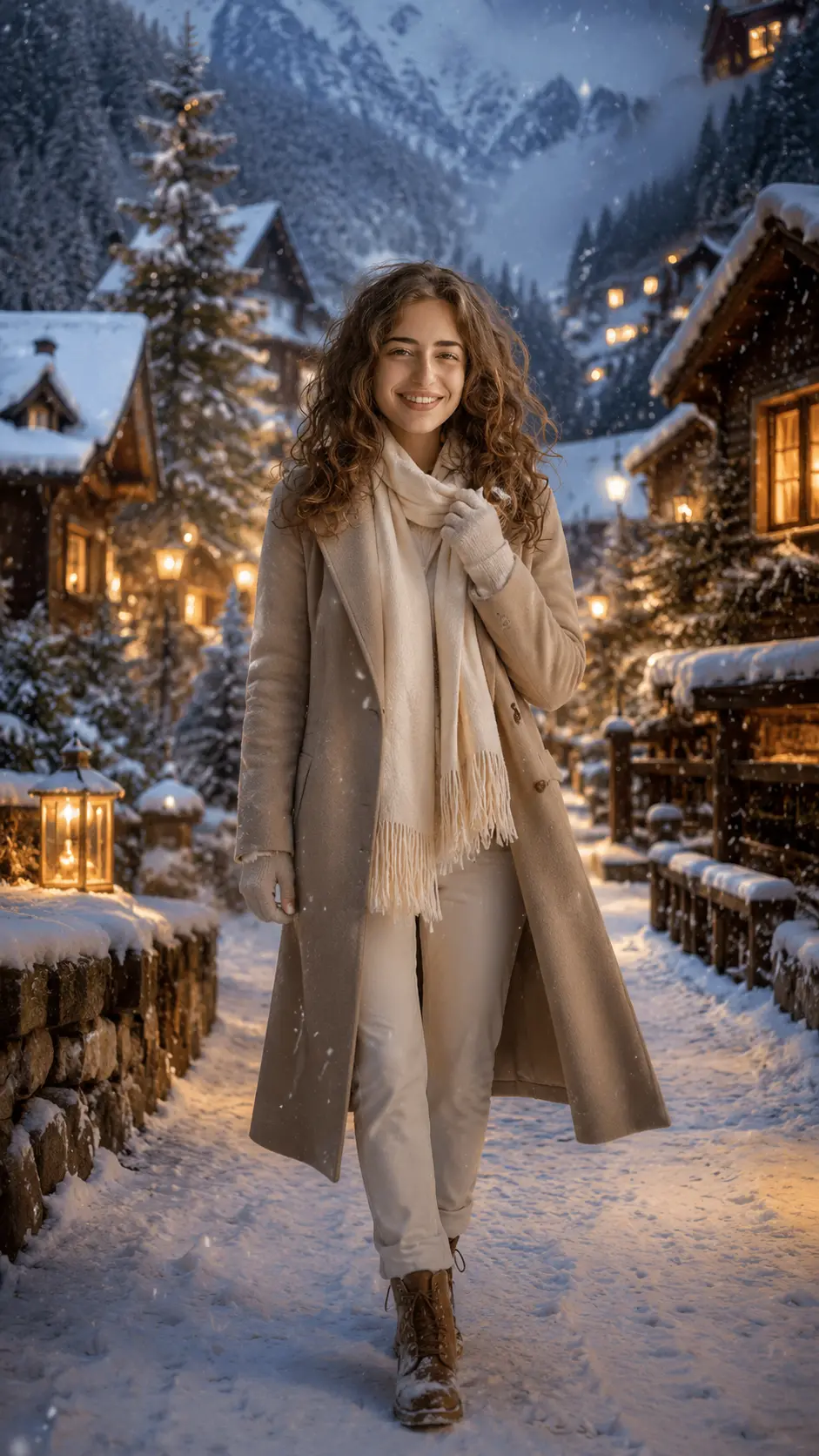
Cinematic Winter Portrait in Snowy Mountain Village
Copy Prompt
Copy the full prompt text to use it anywhere you like.
Copy was blocked by your browser. Select the prompt text below and copy it manually.
Choose image aspect ratio
Selected:Original keeps the saved wording. Choosing a ratio edits the copied text; also set the output size in your image tool.
Copy was blocked by your browser. Select the prompt text below and copy it manually.
Prompt guide
How to use this AI image prompt
Overview
Cinematic Winter Portrait in Snowy Mountain Village is a detailed AI image prompt for turning an uploaded portrait into an ultra-realistic vertical winter scene. It places the recognizable subject in a peaceful alpine village with falling snow, wooden cabins, glowing lanterns, snow-covered pines, distant mountains, and a balanced mix of golden evening light and cool blue tones.
The prompt prioritizes identity preservation, realistic anatomy, natural skin texture, age-appropriate presentation, and gender-neutral winter styling. Rather than radically beautifying or reshaping the subject, it directs the model to retain facial structure, skin tone, hairstyle, apparent age, and overall likeness. The intended result is a premium editorial portrait with the emotional warmth of a holiday film.
This can be used as a ChatGPT image prompt, Gemini image prompt, Gemini photo prompt, or a general AI image prompt in tools that accept a reference photo. It also works as an AI photo editing prompt when the platform can preserve a person while replacing or expanding the setting.
Best Use Cases
This prompt is ideal for users who want a polished seasonal portrait without arranging a winter photoshoot. Its 9:16 composition is especially suitable for Instagram Stories, Reels covers, phone wallpapers, Pinterest posts, holiday greetings, profile images, and other vertical social content.
Portrait photographers and content creators can use it to explore cinematic winter photography concepts before planning a real shoot. Families can create tasteful seasonal edits for adults or children because the instructions call for age-appropriate poses, expressions, proportions, and clothing. It is also useful for anyone seeking a cozy snowy village portrait, realistic holiday photo edit, or luxury alpine fashion look.
The concept works best when the person should remain the clear focal point. The softly blurred cabins, lantern bokeh, snowfall, mist, and mountain scenery provide atmosphere without overpowering the face.
How to Customize This Prompt
The original instructions already give the model flexibility to select a flattering pose and winter outfit. For more control, add a few precise preferences rather than rewriting every visual detail.
- Choose one pose, such as walking through the snow, holding a scarf, catching snowflakes, or standing beside a lamp post.
- Specify framing as full-body or three-quarter. Three-quarter framing usually gives the face more visual importance, while full-body framing shows the outfit and snowy pathway.
- Select an outfit and palette, such as a camel wool coat with a cream scarf, a navy puffer jacket with grey knitwear, or a forest-green coat with black boots.
- Adjust the emotion with wording such as softly smiling, thoughtful, looking into the distance, or calmly looking back at the camera.
- Refine the setting by emphasizing alpine cabins, mountain visibility, lantern-lit streets, heavier snowfall, subtle mist, or fresh footprints.
- Keep 9:16 for mobile content, or change the ratio only when a platform supports another intended format.
Avoid adding conflicting directions. For example, asking for both a close-up and a full-body composition may reduce consistency. Likewise, too many outfit colors or competing poses can make the result less coherent.
Tips for Better Results
A strong reference image is essential because facial identity is a central requirement. Models vary in how accurately they follow reference photos, so careful input and a few controlled revisions usually produce better results than repeatedly changing the whole concept.
- Upload a clear, well-lit image with the full face visible and minimal blur, filters, or heavy shadows.
- Use a photo that shows the hairstyle clearly if preserving hair shape and length is important.
- Start with one person. Group photos can make identity selection and facial consistency more difficult.
- Check the face, hands, fingers, coat edges, boots, and interaction with snow before accepting the result.
- If the face drifts, repeat that the uploaded photo is the only identity reference and reduce unnecessary styling changes.
- If the background looks artificial, request varied snowflake sizes, natural accumulation, believable footprints, subtle breath, and realistic lantern reflections.
- If the face is too dark, ask for soft natural illumination from a nearby cabin window or lamp while retaining the cool evening atmosphere.
- Generate several versions when possible. Small variations in pose, snowfall, expression, and lighting can significantly affect realism.
For children or younger-looking subjects, review the generated clothing, proportions, and pose carefully to ensure the final portrait remains natural, family-friendly, and age-appropriate.
What to Expect
The expected output is a realistic vertical winter portrait with the subject centered on a snowy village path. The face should appear sharp and naturally lit, while cabins, pine trees, mountains, mist, and warm bokeh lights recede into a shallow depth of field. Wool, knitwear, fleece, and quilted fabrics should show convincing texture, with subtle snow on the clothing or hair when appropriate.
The strongest results will show warm-and-cool cinematic contrast, believable evening snowfall, realistic shadows, and an uncluttered composition. Exact identity accuracy, hand quality, and fine fabric detail can differ between models and generations. Some outputs may need another pass to correct anatomy, facial drift, excessive background blur, fake-looking snow, random text, or watermarks. With a suitable reference photo and focused customization, this prompt can produce a cozy, elegant winter portrait suitable for sharing or personal display.