























































Events

Current and upcoming events

View all
No events available yet.
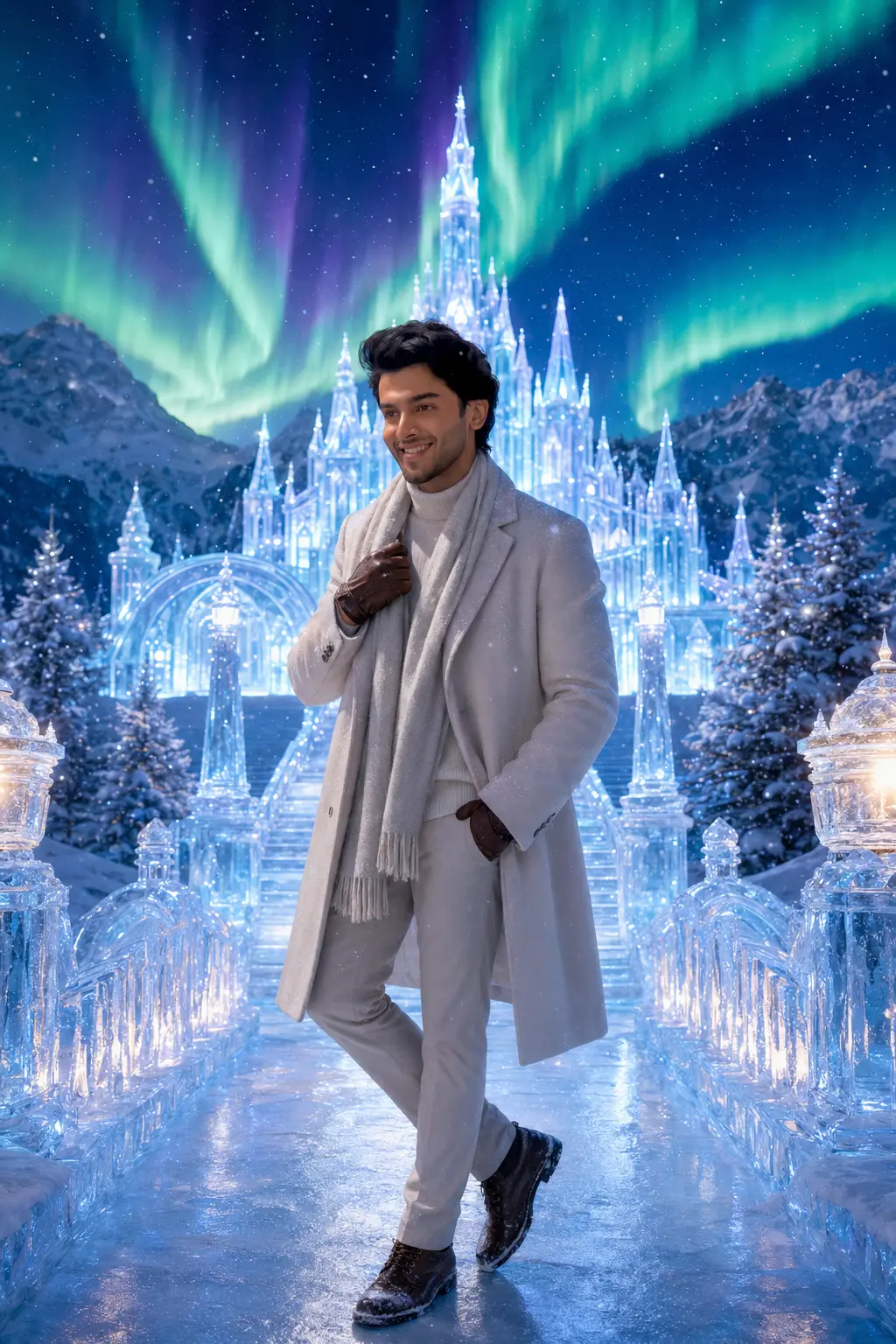
A man in elegant winter clothing standing on an icy pathway leading to a glowing ice palace under vivid northern lights, surrounded by snow and icy trees.
98

Prompt Detail

Cinematic Winter Portrait with Glowing Ice Palace and Aurora

Copy Prompt

Copy the full prompt text to use it anywhere you like.

Copy was blocked by your browser. Select the prompt text below and copy it manually.

Choose image aspect ratio

Selected:

Original keeps the saved wording. Choosing a ratio edits the copied text; also set the output size in your image tool.

Create an ultra-realistic, cinematic winter portrait featuring the person from the uploaded user image as the main subject standing in front of a breathtaking glowing ice palace on a snowy night beneath the northern lights. Use the uploaded image from the user as the only identity reference. Strictly preserve the person’s exact facial structure, facial features, skin tone, hairstyle, apparent age, and overall recognizable identity. Do not replace, reshape, heavily beautify, or change the person into someone else. Keep the person clearly recognizable. Automatically adapt the person’s body proportions, outfit, styling, pose, and emotional expression according to the apparent age of the uploaded person. Keep the entire concept tasteful, family-friendly, age-appropriate, and completely gender-neutral, so it works naturally for men, women, boys, and girls. Create a visually unforgettable winter fantasy scene in a majestic frozen landscape. Place the person on a snow-covered pathway or crystal ice bridge leading toward a magnificent ice palace or frozen castle made of glowing blue-white ice, glass-like towers, shimmering frozen arches, and sparkling crystal textures. Above the palace, fill the sky with a dramatic display of aurora borealis in vivid green, blue, turquoise, and purple, creating a magical winter atmosphere. Surround the subject with: a grand glowing ice palace in the background crystal-clear frozen arches and icy towers snow-covered pine trees lit with soft winter glow a sparkling frozen lake or icy pathway softly falling snowflakes glowing lanterns or icy light pillars lining the path distant snowy mountains subtle mist in the cold air shimmering reflections on the ice aurora lights across the sky tiny frost sparkles floating in the atmosphere Place the person as the clear focal point in the scene, standing or walking naturally toward the glowing palace. The composition should feel epic, luxurious, magical, and instantly attention-grabbing, like a premium winter fantasy movie poster or viral social media masterpiece. Show the person in a beautiful winter pose, such as: standing still while looking toward the glowing ice palace walking gracefully across a snowy or icy path turning softly toward the camera with a calm, enchanted expression gently holding a scarf, coat collar, or gloves in the winter breeze lightly extending a hand as snow falls around them standing with a peaceful, elegant, heroic posture beneath the aurora pausing on an icy bridge with the palace glowing behind Choose the pose that creates the most amazing and visually captivating winter portrait. Adjust the facial expression and mood according to the magical winter setting. The person should appear: amazed peaceful elegant dreamy softly happy calm enchanted emotionally connected to the beauty of the moment Dress the person in premium winter fashion suited for a luxurious snowy fantasy scene, while remaining fully gender-neutral. Automatically choose stylish winter clothing such as: a luxurious long coat, elegant puffer, or premium wool overcoat a cozy knitted sweater or layered winter top scarf gloves winter boots elegant cold-weather trousers or other suitable winter clothing optional beanie, earmuffs, fur-lined hood, or winter cap if suitable Use rich winter colors such as: ivory white silver navy charcoal soft blue deep green muted purple cream black The outfit should look premium, realistic, and beautifully textured, with visible winter materials such as wool, knitwear, quilted fabric, velvet-like cold-weather layers, fleece, and soft layered folds. Add a light natural dusting of snow on the shoulders, sleeves, or hair if suitable. Make the environment feel deeply magical and immersive with: reflections of the palace lights shimmering on the ice sparkling frost patterns on the frozen surface soft snowfall illuminated by palace glow subtle visible breath in the freezing air glowing icy highlights around the pathway dreamy atmospheric haze elegant bokeh lights in the background a powerful contrast between cold blue ice and colorful aurora light Use professional cinematic winter photography style with: eye-level or slightly low-angle framing full-body or elegant three-quarter composition sharp focus on the person’s face realistic skin texture detailed hair strands natural cold-weather lighting on the face shallow depth of field while preserving the grandeur of the palace softly blurred distant mountains and winter background aurora and palace glow reflecting softly on the person’s face and clothing realistic shadows and highlights high dynamic range premium editorial winter-photography quality luxury cinematic color grading Create striking lighting by combining: cool moonlight from the winter night colorful glow from the aurora borealis luminous icy blue light from the palace soft warm hints from lanterns if used subtle rim lighting around the subject reflected light from the icy ground and frozen surfaces The final image should feel like a spectacular, high-end winter masterpiece — magical, luxurious, dramatic, and instantly eye-catching — something users would love for social media, profile pictures, wallpapers, posters, and viral winter edits. Ensure: exact identity preservation gender-neutral styling age-appropriate outfit and pose realistic anatomy natural hands and fingers believable body proportions realistic winter clothing natural interaction with snow and ice correct lighting and reflections no awkward pose no cluttered composition Avoid: altered facial identity extra fingers or limbs distorted anatomy fake-looking aurora unrealistic palace structure blurry face messy background cartoon styling poor lighting low-quality textures watermarks random text Use the uploaded image from the user as the identity reference and provide image in 9:16 ratio.

Copy was blocked by your browser. Select the prompt text below and copy it manually.

Note: Use this prompt as a starting point. Results depend on the image tool, settings and any reference image you provide.

Prompt guide

How to use this AI image prompt

ChatGPT image prompt Gemini image prompt Gemini photo prompt AI image prompt AI photo editing prompt cinematic winter portrait prompt aurora borealis portrait prompt glowing ice palace photo edit winter fantasy portrait prompt 9:16 AI portrait prompt

Overview

Cinematic Winter Portrait with Glowing Ice Palace and Aurora is a detailed AI image prompt for transforming an uploaded portrait into a premium winter-fantasy scene. It places the recognizable subject on a snowy path or crystal bridge, with a luminous ice palace, frozen arches, distant mountains, falling snow, and colorful northern lights completing the environment.

The concept prioritizes facial identity, realistic anatomy, age-appropriate presentation, and gender-neutral winter styling. Instead of changing the person into a fantasy character, it aims to preserve their face, skin tone, hairstyle, and apparent age while naturally adapting the clothing, pose, and expression to the setting.

This prompt works well as a ChatGPT image prompt, Gemini image prompt, or general AI image prompt when the selected model supports reference-image generation. Its cinematic lighting instructions combine moonlight, icy blue palace illumination, aurora colors, and optional warm lantern accents. The requested 9:16 format is especially suitable for mobile screens, Stories, Reels covers, and vertical posters.

Best Use Cases

This winter portrait prompt is ideal for people who want an elevated seasonal edit without losing their recognizable appearance. It can produce attention-grabbing profile images, holiday posts, fantasy portraits, phone wallpapers, poster-style artwork, or personalized winter gifts.

Portrait photographers and digital creators can use it to explore a luxury editorial concept before arranging a physical shoot. Social media users can create a dramatic seasonal image featuring a calm, heroic, dreamy, or enchanted mood. Because the styling is intended to adapt to apparent age and remain family-friendly, the concept can also work for adults, teenagers, and children when an appropriate reference photo is supplied.

As a Gemini photo prompt or AI photo editing prompt, it is particularly useful when the goal is to retain a real person while replacing an ordinary background with a polished frozen kingdom.

How to Customize This Prompt

The core scene is already highly specified, but a few focused adjustments can make the result feel more personal. Change only one or two major variables per generation so the model can maintain a coherent composition.

  • Choose a pose: walking toward the palace creates narrative movement, while turning toward the camera gives stronger facial visibility.
  • Refine the outfit with one preferred color, such as navy, ivory, charcoal, deep green, or muted purple.
  • Select the framing. Use a three-quarter portrait for greater facial detail or a full-body view to feature the bridge, boots, and palace approach.
  • Adjust the mood with terms such as peaceful, amazed, softly happy, elegant, or heroic.
  • Emphasize either the glowing ice palace or the aurora, rather than asking both elements to dominate equally.
  • Specify restrained snowfall for a cleaner portrait, or brighter illuminated snowflakes for a more magical poster effect.
  • Choose lanterns for warm contrast or icy light pillars for a fully cool-toned atmosphere.

For a men’s portrait variation, premium wool outerwear, structured layers, and a composed stance can strengthen the cinematic look while remaining faithful to the prompt’s gender-neutral approach.

Tips for Better Results

Start with a clear, well-lit reference photo showing the face without heavy filters, motion blur, or major obstructions. A front-facing or slight three-quarter angle generally gives the model better identity information. If possible, use a source image with visible hair contours and natural skin texture.

  • Keep identity instructions near the beginning when adapting this into another ChatGPT image prompt or Gemini photo prompt.
  • Ask for sharp eyes and facial detail while allowing the distant palace and mountains to remain softly blurred.
  • If the face changes too much, simplify the first attempt by using a three-quarter composition and a natural standing pose.
  • If hands appear distorted, choose a pose holding a coat collar or keeping gloved hands relaxed and clearly visible.
  • If the aurora looks artificial, request broad, diffused light ribbons with subtle atmospheric blending rather than hard neon bands.
  • Check that palace light, aurora color, and lantern glow are reflected consistently on clothing, snow, and ice.
  • Avoid adding too many accessories. A scarf, gloves, and one optional head covering are usually enough.
  • Generate several versions and compare facial accuracy, anatomy, reflections, and background clarity before selecting one.

Different image models interpret reference strength and long instructions differently. If a model overlooks details, shorten the AI photo editing prompt while retaining identity preservation, the ice palace, aurora lighting, realistic winter fashion, and vertical composition.

What to Expect

A successful result should resemble a high-end winter movie poster or luxury editorial portrait. The person will remain the central focal point, surrounded by blue-white architecture, sparkling ice, snowy trees, atmospheric mist, and green, turquoise, blue, or purple aurora light. Cold illumination should be balanced by natural skin rendering and, when included, subtle warm lantern highlights.

Expect some variation in palace design, snowfall, pose, clothing details, and aurora placement across models and generations. Exact identity preservation can also vary depending on reference-image support. Review the face, fingers, body proportions, clothing folds, shadows, and ice reflections carefully. The strongest result will feel magical and dramatic while still looking photographically believable, uncluttered, and recognizably personal.

Keep Exploring

Related prompts

Explore More

Related categories

Explore more image prompts in categories connected to this prompt's topics.

Tag Cloud

Explore more tags

Keep browsing related styles, tools, and prompt themes after this prompt.