Prompt Detail
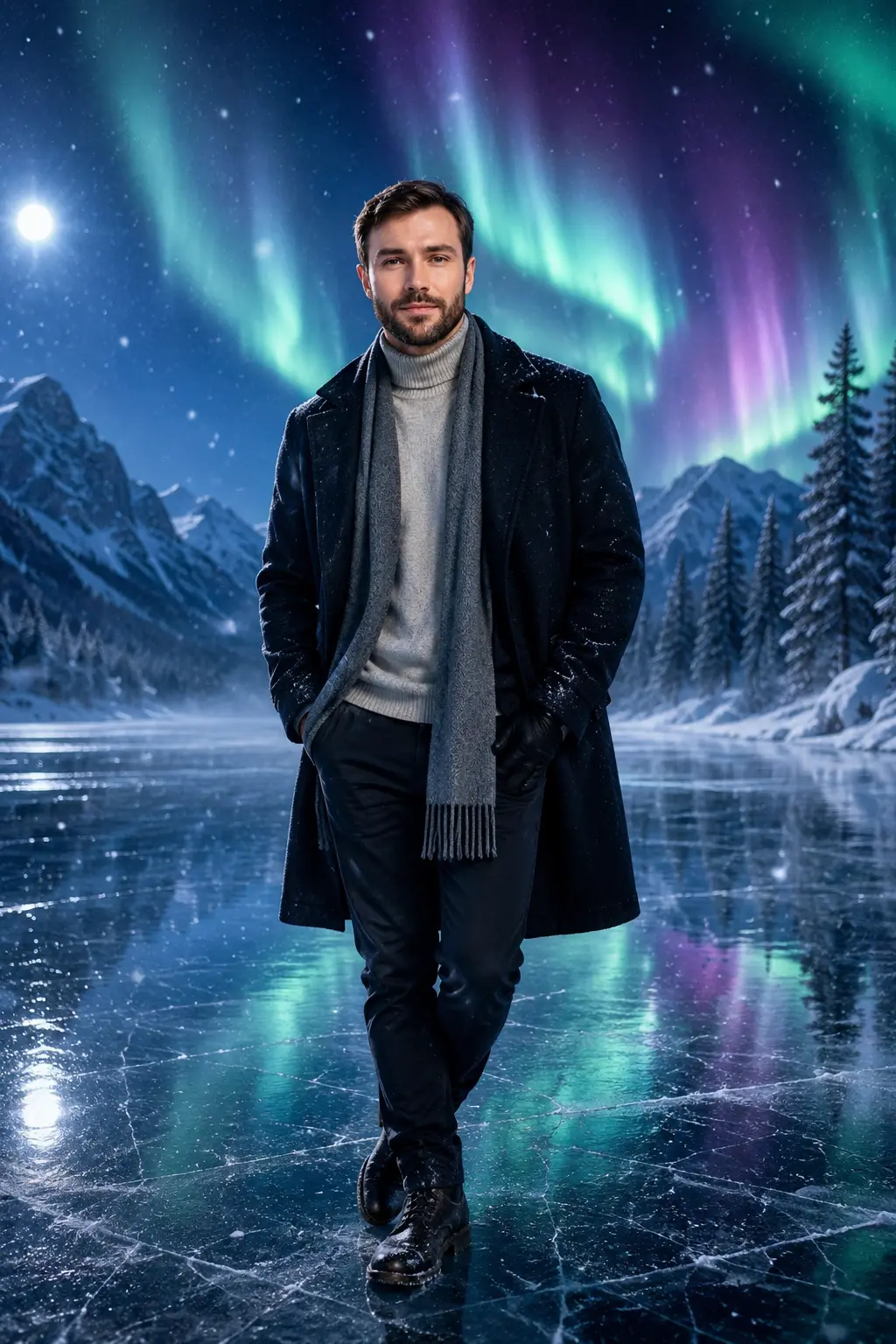
Cinematic Winter Portrait with Northern Lights on Frozen Lake
Copy Prompt
Copy the full prompt text to use it anywhere you like.
Copy was blocked by your browser. Select the prompt text below and copy it manually.
Choose image aspect ratio
Selected:Original keeps the saved wording. Choosing a ratio edits the copied text; also set the output size in your image tool.
Copy was blocked by your browser. Select the prompt text below and copy it manually.
Prompt guide
How to use this AI image prompt
Overview
Cinematic Winter Portrait with Northern Lights on Frozen Lake is an identity-preserving AI image prompt designed to transform an uploaded portrait into a polished winter campaign scene. The subject stands or walks across a crystal-clear frozen lake beneath green, blue, purple, and turquoise aurora light, surrounded by snowy evergreens, distant mountains, drifting mist, and gentle snowfall.
The prompt prioritizes recognizable facial structure, skin tone, hairstyle, apparent age, and realistic proportions. Its gender-neutral styling makes it suitable for men, women, boys, and girls, while age-aware clothing and posing help keep the result tasteful and family-friendly. Premium coats, knitwear, scarves, gloves, and winter boots support the fashion-editorial look without distracting from the person.
This can be used as a ChatGPT image prompt, Gemini image prompt, or adaptable AI image prompt for tools that accept a reference photo. It is especially useful when you want a realistic portrait rather than a generic fantasy character. The requested 9:16 composition is optimized for vertical displays while leaving enough room for the aurora and reflective landscape.
Best Use Cases
This concept works well for social media portraits, profile images, phone wallpapers, winter-themed posts, seasonal greetings, and premium personal edits. Its cinematic scale also suits travel-inspired campaign art, fashion content, dramatic poster-style portraits, and memorable cold-weather photography concepts.
Creators can use it as a Gemini photo prompt for a calm full-body scene or as an AI photo editing prompt when placing a recognizable person into an environment that would be difficult to photograph naturally. Parents may use the age-appropriate direction for children’s winter portraits, while adults can create elegant men’s portraits, fashion edits, or reflective lifestyle images.
For the strongest visual impact, choose this prompt when the goal is peaceful wonder rather than action. The aurora, moonlight, falling snow, and ice reflections are intended to create emotional depth while the person remains the clear focal point.
How to Customize This Prompt
The supplied directions already give the model room to select a suitable pose, outfit, and expression. For more control, add a few precise preferences instead of rewriting every detail.
- Choose a pose such as walking across the ice, looking upward, facing the camera, holding a scarf, or extending one hand into the snowfall.
- Specify full-body or three-quarter framing. Full-body framing emphasizes reflections and the frozen lake, while three-quarter framing gives the face more visual weight.
- Select an outfit direction, such as an ivory wool overcoat, navy puffer coat, charcoal layered knitwear, or deep-green coat with a scarf.
- Adjust the mood with terms such as peaceful, amazed, softly happy, reflective, elegant, or quietly heroic.
- Emphasize selected aurora colors if you want a greener natural look or a more stylized purple-and-turquoise sky.
- Request lighter snowfall for a clean portrait or more visible flakes for a stronger winter atmosphere.
Keep identity instructions intact when customization matters less than facial accuracy. Avoid combining multiple poses, competing outfit ideas, or conflicting camera angles in one generation.
Tips for Better Results
Reference-photo quality strongly affects the output. Use a clear, well-lit image in which the face is unobstructed and large enough for the model to interpret. A neutral expression and natural skin detail usually provide a more dependable identity reference than a heavily filtered or compressed photo.
- Match the source image to the intended angle when possible. A front-facing reference is helpful for a subject turning toward the camera.
- Ask for sharp facial focus, detailed hair, realistic skin texture, natural hands, and believable cold-weather lighting.
- Keep the 9:16 ratio for stories, reels, wallpapers, and vertical poster compositions.
- If the face becomes too small, request three-quarter framing or reduce the scale of the mountains and sky.
- If the aurora looks artificial, ask for softer atmospheric glow, realistic light diffusion, and restrained saturation.
- If ice reflections are inaccurate, reinforce that the reflection should align with the subject’s position, lighting, and body shape.
- Generate several variations, then refine only the strongest result with targeted corrections for hands, clothing texture, facial clarity, or background clutter.
Different platforms interpret reference identity and negative instructions differently. A detailed Gemini image prompt may benefit from shorter follow-up edits, while another model may respond better when the most important requirements—identity, anatomy, facial sharpness, and realistic lighting—appear first.
What to Expect
The expected result is an ultra-realistic vertical winter portrait with a dominant, recognizable subject and a grand but controlled background. Cool moonlight, colorful aurora illumination, reflected light from the ice, and subtle rim lighting should produce a premium cinematic finish. Visible wool, knitwear, quilted fabric, frost, breath, snow, and ice texture add physical realism.
Results may vary by model, reference-photo quality, and support for identity-guided generation. Some tools may exaggerate aurora colors, soften facial details, or struggle with fingers and reflections. These issues are best corrected through focused revisions rather than adding more unrelated description.
When rendered successfully, this winter portrait prompt should deliver a luxurious, dreamlike image suited to personal sharing, seasonal design, fashion presentation, or a cinematic frozen-lake wallpaper without losing the subject within the scenery.