































Prompt Detail
Cyberpunk Neon Side Profile Portrait of Young Male
Copy Prompt
Copy the full prompt text to use it anywhere you like.
Copy was blocked by your browser. Select the prompt text below and copy it manually.
Choose image aspect ratio
Selected:Original keeps the saved wording. Choosing a ratio edits the copied text; also set the output size in your image tool.
Copy was blocked by your browser. Select the prompt text below and copy it manually.
Prompt guide
How to use this AI image prompt
Overview
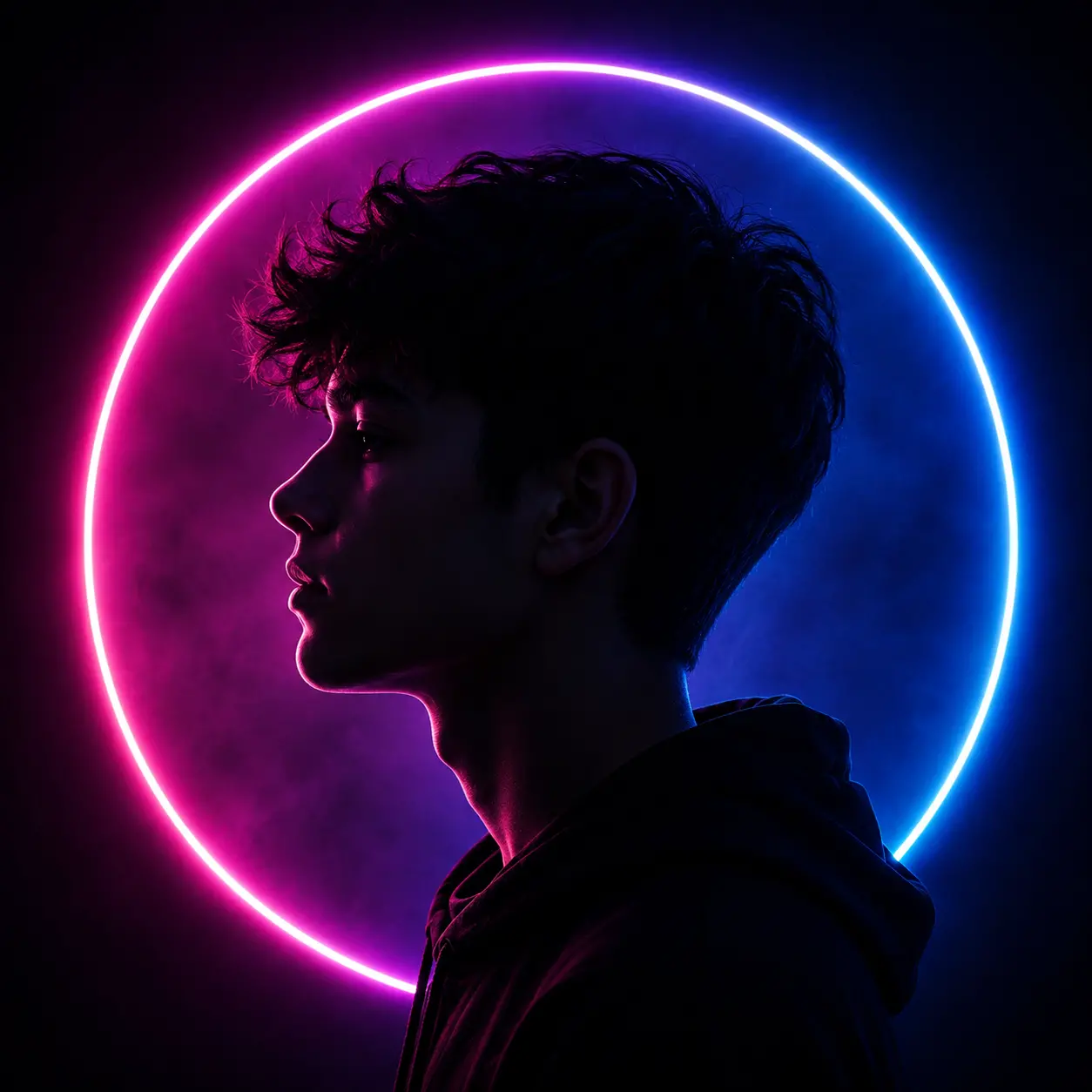
Boy Neon Ring Light Profile is a photorealistic portrait concept designed to transform a reference photo of a young adult man into a premium cyberpunk-inspired fashion image. The composition combines a clean left-facing profile, a matte-black hoodie, cinematic shadows, and a large neon halo transitioning from hot magenta to electric cyan. Its vertical 9:16 framing makes the result especially suitable for mobile-first creative work.
This detailed AI image prompt prioritizes recognizable identity rather than turning the subject into a generic fashion model. It asks the model to retain facial structure, skin tone, hairstyle, age, and other distinctive features while using dramatic studio lighting. The intended finish is realistic and editorial, with visible pores, individual hair strands, believable fabric, and controlled color reflections.
The concept can work as a ChatGPT image prompt, Gemini image prompt, or Gemini photo prompt when the chosen platform supports reference-image generation or editing. It is best approached as an AI photo editing prompt because the uploaded portrait supplies the identity, while the instructions define the pose, wardrobe, lighting, background, and photographic treatment.
Best Use Cases
This prompt is well suited to musicians, creators, fashion enthusiasts, actors, and young professionals who want a striking profile portrait without losing their natural appearance. The neon halo and dark studio atmosphere make it useful for album artwork, artist announcements, social media profile features, portfolio covers, posters, and vertical promotional graphics.
It also fits Men’s Portrait and Luxury Fashion projects where a minimalist wardrobe needs to feel polished and expensive. The black hoodie keeps the styling accessible, while the magenta, violet, and cyan lighting creates the visual impact of a professional music editorial or futuristic fashion campaign.
Designers can use the result as a central portrait for a layout, although text should be added afterward in a separate design tool. The prompt specifically excludes generated words, logos, borders, and watermarks, helping produce a cleaner base image.
How to Customize This Prompt
Begin with a clear, well-lit reference photo that shows the subject’s face, hairstyle, and jawline. A side view is helpful but not mandatory if the model can reliably reconstruct identity from another angle.
Useful customizations include:
- Change the hoodie to a matte-black jacket or other minimal dark garment while preserving the uncluttered silhouette.
- Adjust the magenta-to-cyan balance to favor warmer pink light or cooler blue rim lighting.
- Move the face slightly left or right to create space for a poster or cover layout.
- Request softer haze for a cleaner studio portrait or stronger smoke for a more atmospheric cyberpunk look.
- Modify the crop from shoulders-up to upper-chest framing, while keeping the facial profile dominant.
- Reduce bloom if the neon ring overwhelms the hair and profile edges.
When adapting this Gemini image prompt or ChatGPT image prompt, retain the identity-preservation language and the instruction for one subject. These details reduce the chance of receiving an unrelated model or unintended background people.
Tips for Better Results
Reference quality strongly affects facial resemblance. Use a sharp image without heavy filters, extreme shadows, sunglasses, or hair covering important facial landmarks. Confirm that you have permission to use the person’s photo.
For more consistent generation:
- Keep the left-facing direction explicit, because some models may reverse the profile.
- Preserve the 85mm-style portrait perspective to avoid wide-angle facial distortion.
- Ask for sharp focus on the facial outline and nearest eye, with shallow depth of field behind the subject.
- Keep the neon ring behind the head so it does not cut across the face or appear as a foreground object.
- Use controlled saturation to protect realistic skin color under strong pink and blue illumination.
- Regenerate or edit locally if the ear, shoulder, hairline, or ring geometry appears malformed.
If the first AI photo editing prompt result changes the face too much, simplify secondary atmosphere details and reinforce natural facial proportions. If the face becomes too dark, request slightly more shadow detail rather than flat frontal lighting. Different tools interpret reference strength, colored light, and negative instructions differently, so small iterative changes are more dependable than adding many new effects at once.
What to Expect
A successful result should show one young man in a calm left-facing profile, wearing a black hoodie against a deep black, purple, and midnight-blue studio background. The circular light should form a recognizable halo, with magenta shaping the front of the profile and cyan outlining the back of the hair, neck, hood, and shoulder.
Expect a mysterious, youthful luxury-fashion portrait with strong contrast, crisp facial edges, realistic texture, and soft atmospheric separation. The central face will remain intentionally shadowed but should still be recognizable. Results may vary by model, especially in identity accuracy, ring continuity, and subtle colored reflections. Used as a focused neon portrait AI image prompt, the concept provides a strong foundation for polished 9:16 editorial artwork.