


























Prompt Detail
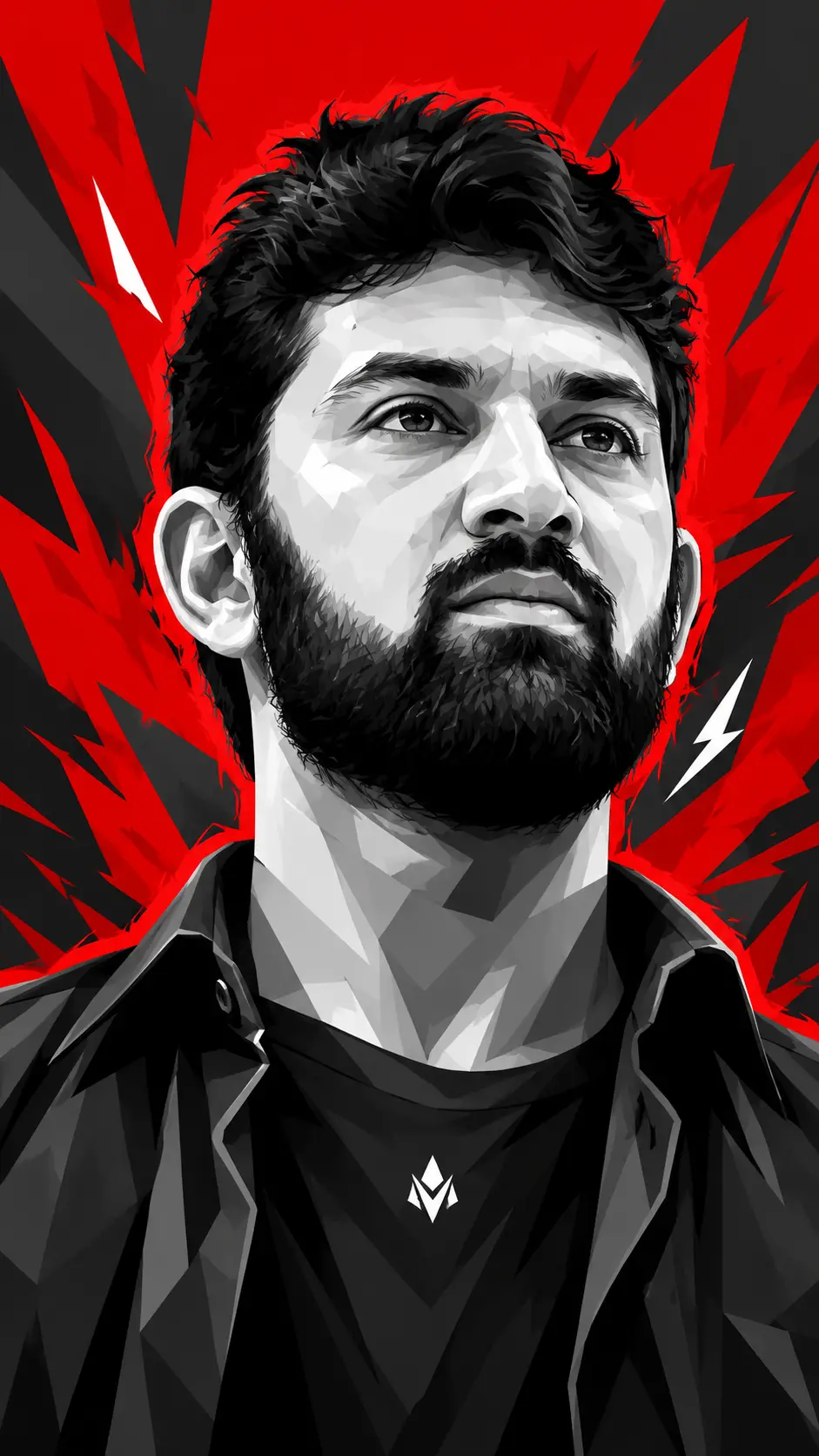
Dynamic High-Contrast Vector Portrait
Copy Prompt
Copy the full prompt text to use it anywhere you like.
Copy was blocked by your browser. Select the prompt text below and copy it manually.
Choose image aspect ratio
Selected:Original keeps the saved wording. Choosing a ratio edits the copied text; also set the output size in your image tool.
Copy was blocked by your browser. Select the prompt text below and copy it manually.
Prompt guide
How to use this AI image prompt
Overview
Dynamic High-Contrast Vector Portrait is an AI image prompt for creating a bold vertical poster centered on a confident male subject. Its defining feature is the dramatic low-angle close-up: the raised chin, visible neck, sharp jawline, and upward gaze give the portrait a calm yet aspirational attitude. Slightly asymmetrical framing keeps the composition energetic rather than making it feel like a conventional front-facing headshot.
The visual treatment combines semi-realistic facial detail with modern vector pop art and WPAP-inspired geometry. Grayscale polygonal planes model the face, hair, neck, and clothing without soft gradients. A rough electric-red rim outline separates the subject from a red-dominant background filled with dark angular shards and restrained white accents.
This can work as a ChatGPT image prompt, Gemini image prompt, or general AI image prompt when you want a premium editorial or poster-style male portrait. It is especially useful for users seeking anime-adjacent energy without simplified anime facial rendering. The requested 9:16 format also makes it well suited to mobile-first artwork.
Best Use Cases
This prompt is a strong choice for vertical character posters, social media story graphics, profile artwork, music-inspired cover concepts, motivational visuals, and stylized editorial portraits. The upward-looking pose communicates ambition, composure, determination, and attitude, while the red, black, and grayscale palette creates immediate visual impact.
Designers and creators can use it to develop a fictional male character, an elegant man portrait, or a consistent visual direction for a campaign. It also suits anyone experimenting with vector portrait prompt ideas, high-contrast pop-art portraits, or dramatic close-up compositions.
As a Gemini photo prompt, it is more illustration-focused than photographic, but the detailed anatomy and semi-realistic face can still produce a believable subject. It may also serve as the foundation for an AI photo editing prompt if your chosen tool supports reference-image transformation. In that case, use a clear upper-body source photo with a visible jawline and enough space around the hair and shoulders.
How to Customize This Prompt
Adjust a few controlled details while preserving the low viewpoint, raised chin, upward eyes, and geometric rendering. Those elements create the prompt’s recognizable identity.
- Change the subject through age range, facial structure, beard definition, eyebrow shape, or hair length. Keep the hair thick, irregular, and jagged if you want the same energetic silhouette.
- Refine the mood with terms such as composed, defiant, visionary, reserved, or heroic. Avoid conflicting emotions that may weaken the serious upward gaze.
- Modify the clothing while retaining a simple dark crew-neck layer and open collar. Complex patterns or bright garments can distract from the sculpted face.
- Personalize the small chest emblem with a generic geometric mark, but avoid making it large enough to compete with the portrait.
- Shift the red background toward crimson, scarlet, or deep vermilion while maintaining strong contrast with charcoal shards and limited white accents.
- For a more anime-influenced result, request slightly sharper eyes or more expressive hair. For greater realism, emphasize natural facial proportions and restrained stylization.
When adapting this as an AI photo editing prompt, specify which identity traits must remain recognizable and which visual elements may be transformed.
Tips for Better Results
Image models can interpret perspective and style instructions differently, so prioritize the most important constraints and review the first output before adding more detail.
- Keep the 9:16 vertical ratio and request a bust crop from the upper chest upward.
- Reinforce “viewed from below” if the model returns an eye-level portrait. Mention the elevated chin and prominent neck together.
- Ask for hard-edged tonal planes, crisp polygons, and flat grayscale blocks to prevent smooth airbrushing or painterly gradients.
- Limit the palette to red, white, gray, charcoal, and black for a cohesive poster design.
- If the background becomes too busy, reduce the number of white accents and request larger, simpler dark-gray shard shapes.
- If the rim light looks like a clean sticker border, describe it as rough, uneven, broken, and energetic.
- Generate at the highest available resolution, then inspect the eyes, lips, jaw edge, collar, and emblem for malformed details.
For either a ChatGPT image prompt or Gemini image prompt workflow, make one change per revision. This makes it easier to identify which wording improves perspective, anatomy, or color balance.
What to Expect
A successful result should show a commanding grayscale male portrait filling most of a tall frame. The viewer should feel positioned below the subject, with the jaw, chin, and neck carrying much of the visual power. Angular light and shadow planes should create a sculpted face, while messy black hair adds movement above it.
Expect the red silhouette edge and shard-filled background to produce a dramatic poster effect. Clothing will remain dark and secondary, with the small white emblem providing a controlled focal detail. Results will vary by model: some may lean toward clean vector graphics, while others may introduce comic, anime, or painterly qualities. Iterative corrections to the angle, polygonal shading, and background restraint will usually provide the most polished outcome.