















































Prompt Detail
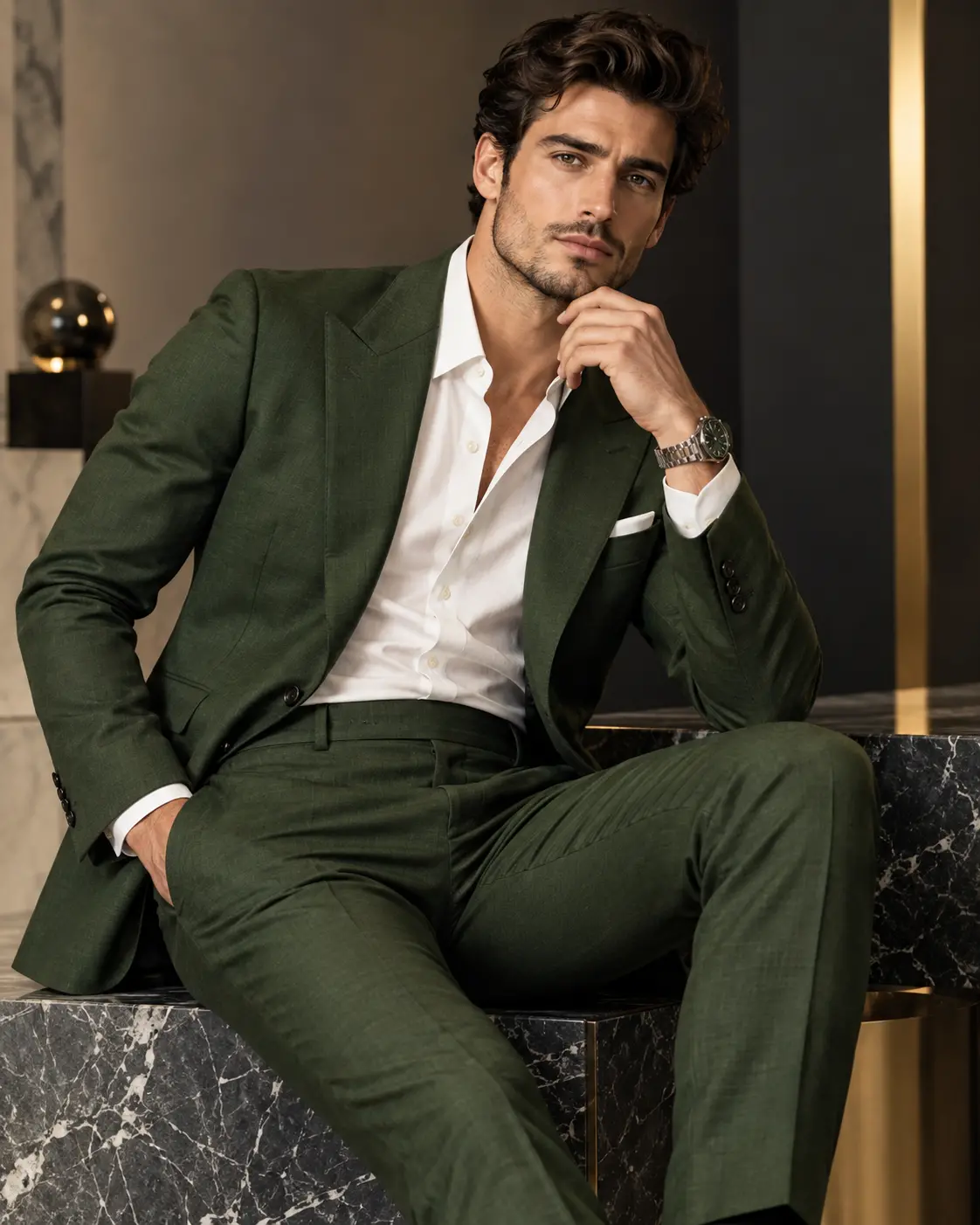
Luxury Men's Fashion Editorial Portrait with Deep Green Tailored Suit
Copy Prompt
Copy the full prompt text to use it anywhere you like.
Copy was blocked by your browser. Select the prompt text below and copy it manually.
Choose image aspect ratio
Selected:Original keeps the saved wording. Choosing a ratio edits the copied text; also set the output size in your image tool.
Copy was blocked by your browser. Select the prompt text below and copy it manually.
Prompt guide
How to use this AI image prompt
Overview
Green Suit Men's Wear Photoshoot Potrait is a reference-based fashion portrait concept for creating a polished, photorealistic image of an adult man in a deep forest-green tailored suit. It prioritizes recognizable facial identity, natural skin texture, accurate grooming, realistic anatomy, and premium menswear details rather than turning the subject into a generic model.
The creative direction combines a three-quarter seated pose with a black marble platform, warm charcoal and beige surroundings, restrained gold accents, and cinematic studio lighting. An open-collar white shirt, white pocket square, and silver wristwatch complete the refined look. The vertical 9:16 framing makes the result suitable for modern campaign layouts and social content.
This can be used as a ChatGPT image prompt, Gemini image prompt, or general AI image prompt in a model that supports reference images. It is also useful as a Gemini photo prompt or AI photo editing prompt when transforming an existing portrait into a luxury menswear editorial while preserving the person’s appearance.
Best Use Cases
This prompt is best for adult men who want a sophisticated fashion portrait without losing their recognizable facial features. It can support personal branding, portfolio development, formal-style inspiration, social media portraits, and luxury suit campaign concepts.
Menswear designers, stylists, photographers, creative directors, and marketing teams can use it to test how a forest-green suit might look within an upscale campaign setting. It also gives portrait photographers a detailed lighting, pose, lens, and color reference for planning a real studio session.
Because the requested composition shows the head and most of the legs, it works especially well for vertical editorial artwork. The uncluttered interior and controlled palette keep attention on the subject, tailoring, and confident expression.
How to Customize This Prompt
Make focused changes while retaining the identity-preservation instructions and core photographic direction. Useful options include:
- Adjust the suit within the established green palette, from a darker forest tone to a slightly richer green, while keeping the premium wool texture and tailored structure.
- Refine the fit by specifying slim, regular, or relaxed tailoring. Keep shoulders, lapels, trousers, and fabric folds physically believable.
- Change the balance of charcoal, beige, black marble, and gold accents to match a preferred brand aesthetic without making the set visually busy.
- Modify the seated pose subtly, such as changing which hand rests near the chin or which leg extends forward. Continue to request natural fingers and correct wristwatch placement.
- Increase background blur for a more intimate portrait or retain slightly more architectural detail for a stronger luxury-interior impression.
- Request gentler contrast for a classic catalog look or deeper shadows and warmer rim light for a more cinematic fashion campaign.
When adapting this AI photo editing prompt, avoid adding conflicting wardrobe, camera, or environment instructions. A clear creative hierarchy helps the model protect the face first, followed by pose, suit construction, lighting, and background styling.
Tips for Better Results
- Upload a clear reference in which the face, eyes, hairstyle, skin tone, and distinctive features are visible. A heavily filtered, blurred, or very small source may reduce facial resemblance.
- If the first result changes the subject’s appearance, reinforce preservation of facial structure, age range, ethnicity, hairstyle, facial hair, and natural complexion. Avoid asking for beauty changes that conflict with identity accuracy.
- Check the hands, chin pose, extended leg, watch, lapels, pocket square, and marble reflections carefully. These detailed areas are common points where image models may need another generation or a targeted edit.
- Keep the eyes as the primary focus. The requested 85mm portrait-lens character, eye-level perspective, and shallow depth of field should create flattering compression without making the face look unnaturally reshaped.
- Preserve visible pores, natural facial lines, and believable suit texture. Reducing aggressive smoothing helps prevent plastic-looking skin and makes the portrait feel more like professional fashion photography.
- Use the 9:16 aspect ratio from the beginning when the tool supports it. Reframing a horizontal result later may remove the extended leg or weaken the seated composition.
Different tools interpret reference strength, lens language, and negative instructions differently. Generate a few controlled variations, changing only one element at a time, rather than rewriting the entire prompt after each attempt.
What to Expect
A strong result should resemble a high-end international menswear campaign: one adult man seated confidently on polished black marble, wearing a sharply tailored forest-green suit and open-collar white shirt. The face should remain prominent and recognizable, with direct eye contact, a calm serious expression, and realistic grooming.
Lighting should sculpt the face and suit from the front-left, preserve detail with soft fill, and create separation through a subtle warm rim light. Expect rich green fabric, clean white accents, deep charcoal shadows, warm beige surroundings, and restrained metallic highlights.
Results will vary by model, especially for identity fidelity, hands, fabric folds, and accessories. Reference-capable systems generally have the best chance of following this detailed men’s portrait photography prompt, but careful review and selective regeneration may still be necessary for a polished 4K-style finish.