





























Prompt Detail
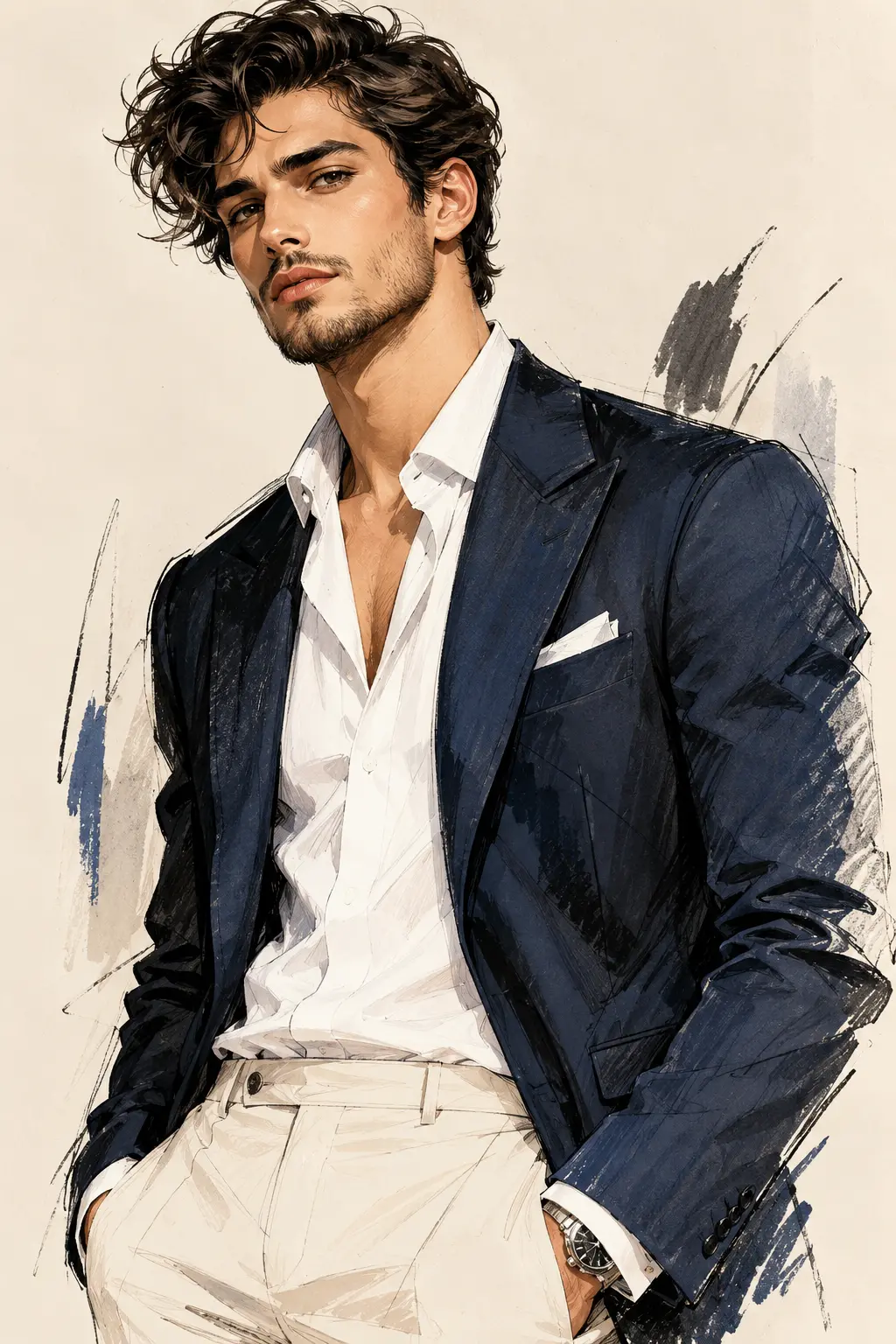
Digital Fashion Illustration of Confident Man in Editorial Menswear
Copy Prompt
Copy the full prompt text to use it anywhere you like.
Copy was blocked by your browser. Select the prompt text below and copy it manually.
Choose image aspect ratio
Selected:Original keeps the saved wording. Choosing a ratio edits the copied text; also set the output size in your image tool.
Copy was blocked by your browser. Select the prompt text below and copy it manually.
Prompt guide
How to use this AI image prompt
Overview
Digital Fashion Illustration Men's AI Prompt Portrait is designed to transform an uploaded photo of an adult man into a polished editorial menswear illustration while preserving his recognizable identity. It prioritizes facial structure, skin tone, hairstyle, age range, and distinctive features instead of replacing the subject with a generic model. The intended composition is a confident three-quarter portrait framed from around mid-thigh upward.
The visual direction combines a realistic, highly detailed face with looser fashion-sketch techniques across the clothing and background. Watercolor washes, charcoal marks, ink contours, and dry-brush textures create an illustrated finish, while studio lighting and an 85mm-style perspective keep the portrait refined and believable. Navy tailoring, cream trousers, a white shirt, and a warm paper-textured backdrop establish a sophisticated luxury-magazine mood.
This can be used as a ChatGPT image prompt, Gemini image prompt, or general AI image prompt when the selected model supports reference-image input and portrait generation. It also works as an AI photo editing prompt for restyling an existing portrait without intentionally changing the person’s identity.
Best Use Cases
This prompt is well suited to men who want an artistic personal portrait, fashion creators developing editorial concepts, stylists presenting menswear ideas, and designers seeking a premium character illustration. It can also support profile artwork, portfolio covers, personal branding visuals, fashion mood boards, or vertical social media content.
The 9:16 format makes it especially useful for mobile-first layouts, story graphics, and full-screen portrait displays. Its clean background and generous negative space help keep attention on the subject, although the instructions intentionally exclude typography, branding, logos, and magazine titles.
As a Gemini photo prompt or another reference-based portrait instruction, it is most effective when the goal is recognizable likeness combined with expressive illustration—not a fully photographic wardrobe replacement or a loose caricature.
How to Customize This Prompt
Start with a clear reference photo showing the face, hair, and key identifying features. Then adjust selected creative details without removing the identity-preservation language.
- Change the blazer color while retaining a controlled neutral palette, such as charcoal, cream, or muted gray.
- Replace the open-collar white shirt with another refined menswear layer if a different editorial mood is needed.
- Modify the pose, crop, or hand placement, but describe each change clearly to reduce anatomical errors.
- Adjust the balance between realism and illustration. Request more watercolor and line work for a sketch-like result, or stronger facial realism for a polished portrait.
- Refine the background using the existing warm ivory, beige, navy, and charcoal family to maintain visual harmony.
- Change the aspect ratio only when required by the destination, such as a less vertical crop for a profile banner.
Avoid adding too many competing garments, accessories, colors, or background objects. The concept depends on a single prominent subject, restrained styling, and a clean editorial composition.
Tips for Better Results
Reference quality strongly affects likeness. Use a sharp, well-lit image with an unobstructed face and natural skin detail. A front-facing or mild three-quarter source usually gives the model better information about the eyes, nose, jawline, and hairstyle.
- Confirm that reference-image guidance or identity preservation is enabled when the platform offers it.
- Generate several variations and compare facial resemblance before evaluating minor clothing textures.
- If the face becomes overly smooth, reinforce natural pores, subtle imperfections, fine facial hair, and controlled highlights.
- If the clothing looks photographic rather than illustrated, emphasize watercolor granulation, dry-brush edges, ink lines, and charcoal marks.
- Inspect hands, fingers, watch placement, pocket interaction, eye alignment, and jacket folds at full size.
- Keep direct eye contact, soft upper-left studio lighting, and gentle fill light consistent during revisions.
- Use targeted follow-up edits instead of regenerating everything when only the hands, background, or fabric treatment needs correction.
Different tools interpret negative instructions differently. For a ChatGPT image prompt or Gemini image prompt, concise follow-up requests may correct local issues more reliably than repeatedly adding broad stylistic terms.
What to Expect
A successful result should show one adult man with a recognizable, realistic face transitioning into expressive editorial brushwork around the blazer, trousers, and outer silhouette. Expect crisp eyes, natural skin texture, believable hair strands, dimensional facial lighting, textured navy fabric, and a restrained ivory-beige studio background.
The overall appearance should sit between luxury fashion photography and hand-rendered menswear illustration. Facial details will generally appear more finished than the clothing edges, which is intentional. The vertical composition should feel polished, spacious, and suitable for premium portrait presentation.
Results will vary by model, reference handling, and generation settings. Some systems may need additional passes to improve resemblance, hands, fabric folds, or the blend between photorealism and watercolor. Review identity accuracy first, then refine anatomy, lighting, and illustration texture in that order.