Prompt Detail
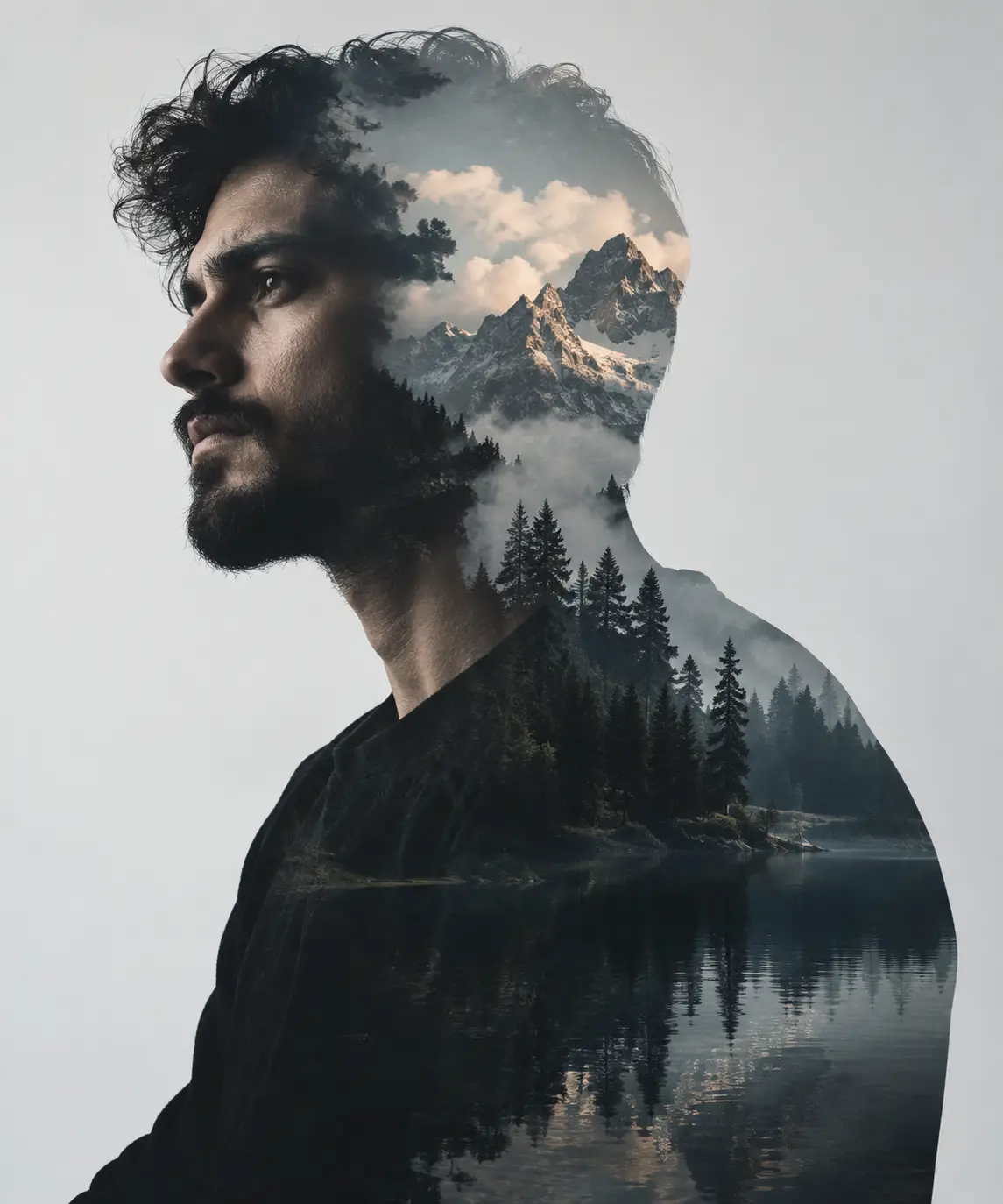
Photorealistic Double-Exposure Potrait with Mountain Landscape
Copy Prompt
Copy the full prompt text to use it anywhere you like.
Copy was blocked by your browser. Select the prompt text below and copy it manually.
Choose image aspect ratio
Selected:Original keeps the saved wording. Choosing a ratio edits the copied text; also set the output size in your image tool.
Copy was blocked by your browser. Select the prompt text below and copy it manually.
Prompt guide
How to use this AI image prompt
Overview
Man Double Exposure Studio Potrait is a detailed AI image prompt for creating a premium, photorealistic portrait of an adult man combined with an alpine wilderness scene. It uses an uploaded reference as the identity guide, aiming to preserve recognizable facial structure, skin tone, hairstyle, age range, facial hair, and other distinctive characteristics rather than generating a generic model.
The intended composition is a chest-up, three-quarter side profile facing left. A mountain landscape is blended through the man’s head, neck, shoulders, and upper torso while important facial details remain visible. Snow-dusted peaks, pine forests, atmospheric fog, and a reflective lake produce the double-exposure effect. A pale studio background and controlled lighting keep the result clean, cinematic, and suitable for a vertical 9:16 portrait.
This can be used as a ChatGPT image prompt, Gemini image prompt, or general AI image prompt when the selected model supports reference images and photorealistic generation. It is especially useful for creators who need a polished balance between personal identity, landscape detail, and editorial portrait lighting.
Best Use Cases
This prompt is well suited to personal fine-art portraits, profile artwork, editorial concepts, portfolio pieces, posters, album-style covers, and social media visuals. The generous negative space may also help when adapting the finished portrait for layouts, although text is intentionally excluded from the generated image itself.
Photographers and retouchers can use it as an AI photo editing prompt to explore double-exposure treatments before building a final composite. Designers can use the concept to connect a subject with themes such as wilderness, solitude, reflection, resilience, or adventure. It is also useful for men seeking an elevated portrait that feels serious and artistic without relying on elaborate clothing or accessories.
A Gemini photo prompt workflow may be particularly practical when a clear reference portrait is available. Results will still vary according to the model’s reference-image controls, identity-preservation ability, and handling of layered scenes.
How to Customize This Prompt
Start with a sharp, well-lit reference in which the man’s face is unobstructed. A reference with a similar three-quarter angle can make it easier for the model to preserve identity while following the requested pose.
Useful adjustments include:
- Change the mountain environment while retaining the same visual structure, such as emphasizing sharper snowy peaks, denser evergreen forests, heavier mist, or a wider lake.
- Adjust the emotional tone by changing the expression from introspective to quietly confident, contemplative, or solemn.
- Modify the color balance with cooler slate blues, deeper forest greens, stronger monochrome treatment, or slightly warmer sunrise highlights.
- Control landscape placement by keeping mountains mostly in the upper head, forests across the neck and shoulders, and water within the lower torso.
- Increase or reduce negative space depending on whether the portrait is intended for a phone wallpaper, poster, story format, or profile crop.
- Adapt facial-hair and hairstyle instructions to match the uploaded reference rather than introducing features the person does not have.
When using the prompt as a Gemini image prompt or ChatGPT image prompt, preserve the identity instructions and simplify secondary scenery only if the model struggles with facial accuracy.
Tips for Better Results
Double exposure is sensitive to competing detail. The face should remain the primary point of attention, while the landscape should read as an integrated internal scene rather than an opaque layer placed over the skin.
- Use one adult subject only and avoid group references, busy backgrounds, sunglasses, extreme shadows, or heavily filtered source photos.
- Ask for one strong three-quarter profile rather than combining profile and front-facing directions.
- Keep the facial plane visible around the eyes, nose, lips, cheekbones, and beard. Allow denser scenery toward the back of the head and lower torso.
- Retain the matte black crew-neck shirt because its simple shape creates a clean silhouette and does not compete with the landscape.
- If the face becomes soft, reduce scenery around the eyes and request sharper facial focus, natural pores, individual beard hairs, and restrained retouching.
- If the composite looks like a basic overlay, emphasize progressive transitions, atmospheric fog, matched contrast, and realistic tonal blending.
- Generate several variations and inspect the eyes, jawline, hair boundary, shoulder outline, tree edges, lake reflections, and mountain placement before selecting a result.
- Use a vertical 9:16 canvas and keep the subject large enough for both identity and internal scenery to remain readable.
For an AI photo editing prompt workflow, subtle corrections usually look more believable than aggressive beauty filtering or extreme saturation.
What to Expect
The expected result is a sophisticated male studio portrait with realistic skin, beard, hair, and facial proportions, set against a pale gray-to-white background. Soft front-left lighting should define the face, while restrained rim light separates portions of the hair and shoulder from the background.
Within the silhouette, warm light should touch distant snowy peaks, mist should separate mountain and forest layers, and a calm lake should provide subtle reflections near the lower torso. The overall palette should remain cool and cinematic, with charcoal, slate, green, blue, and soft white balanced by limited golden highlights.
Different models may interpret identity strength, exposure blending, and landscape detail differently. A capable model should produce a polished commercial-style portrait, but additional generations or targeted edits may be needed to correct facial resemblance, transition edges, reflections, or scenery density.