


























Prompt Detail
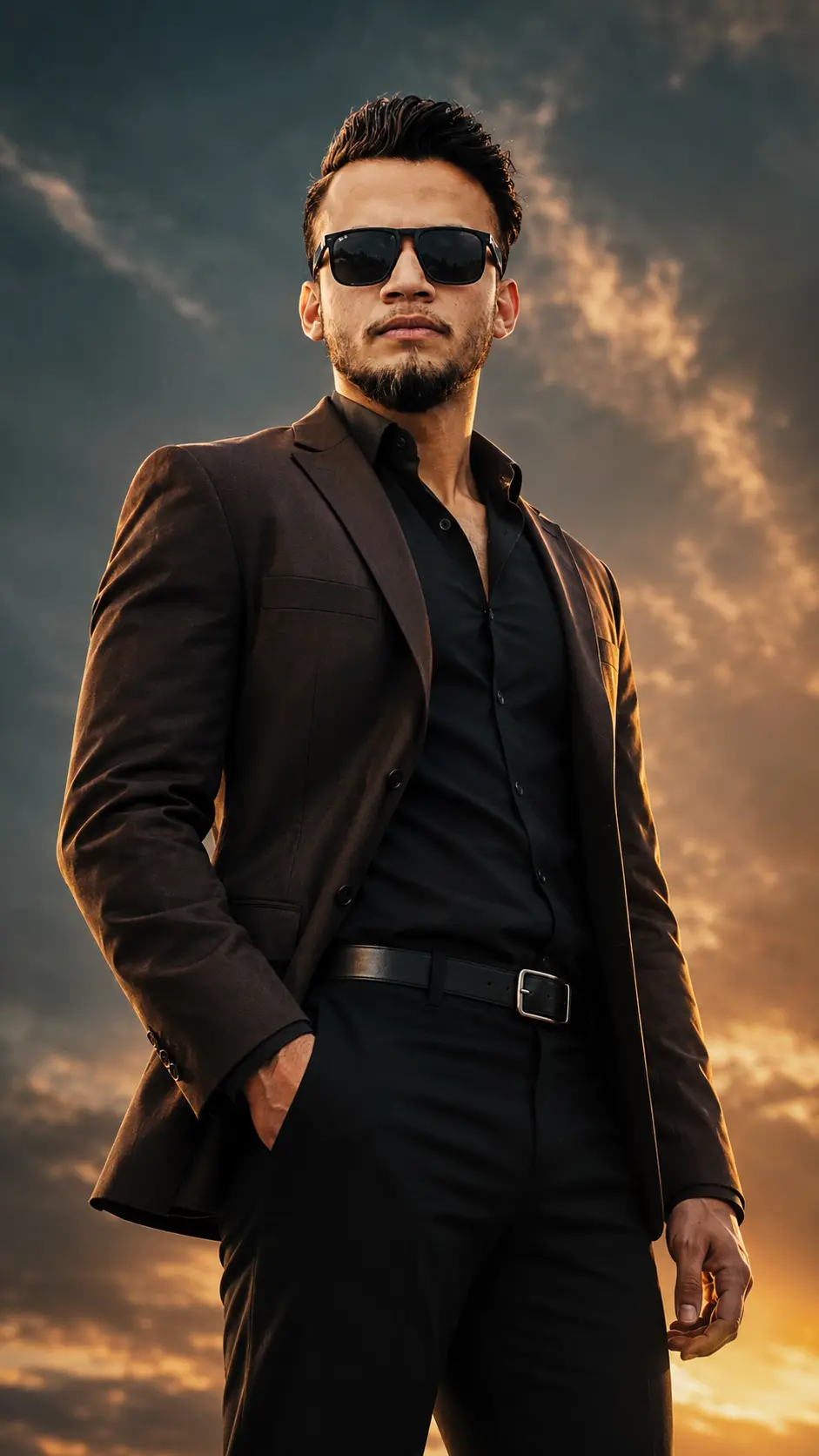
Powerful Stylish Man in Dark Suit with Sunglasses at Sunset
Copy Prompt
Copy the full prompt text to use it anywhere you like.
Copy was blocked by your browser. Select the prompt text below and copy it manually.
Choose image aspect ratio
Selected:Original keeps the saved wording. Choosing a ratio edits the copied text; also set the output size in your image tool.
Copy was blocked by your browser. Select the prompt text below and copy it manually.
Prompt guide
How to use this AI image prompt
Overview
This prompt creates an ultra-realistic, vertical cinematic portrait of a powerful male lead at sunset. The styling combines a structured dark brown blazer, an open-collar black shirt, tailored trousers, a silver belt buckle, and luxury sunglasses. A low camera angle, three-quarter stance, intense side gaze, and dramatic sky reinforce the subject’s confident, heroic presence.
It is well suited to users seeking a cinematic male portrait prompt with premium movie-poster color grading. The 9:16 composition makes it especially practical for mobile wallpapers, social media stories, reels, character concepts, and vertical promotional artwork. Warm golden highlights, deep teal sunset tones, rim lighting, and a softly blurred background help separate the subject while preserving atmospheric scale.
When used as a ChatGPT image prompt, Gemini image prompt, or another AI image prompt, it provides strong direction for pose, wardrobe, lighting, composition, and mood. It can also function as an AI photo editing prompt when a supported tool allows a reference portrait to guide facial identity and natural facial-hair choices.
Best Use Cases
This concept is ideal for men who want an elevated fashion portrait with a commanding screen-hero aesthetic. It can be useful for personal branding, fashion portfolios, actor-style promotional portraits, fictional character posters, profile artwork, or polished social content.
Photographers and designers can use it to explore sunset lighting, low-angle composition, formal menswear, and cinematic color contrast before planning a shoot. Content creators may use the vertical result as a dramatic cover image or story background. The no-text composition also leaves the visual clean, although the strong central subject remains the main focus rather than providing extensive copy space.
A Gemini photo prompt version is particularly useful when working from a clear reference photo and aiming to preserve recognizable features. Results remain model-dependent, so this prompt should be treated as detailed creative direction rather than a guarantee of exact identity matching.
How to Customize This Prompt
Adjust only a few variables at a time so you can identify which changes improve the result. Useful options include:
- Change the blazer from dark brown to black or deep teal while preserving the formal, structured silhouette.
- Choose medium-body or upper-body framing depending on whether the belt buckle and pocket pose should remain visible.
- Increase the warm sunset glow for a golden look, or strengthen the teal clouds for a moodier movie-poster finish.
- Replace the side gaze with a direct gaze if you want a more confrontational portrait.
- Reduce the upward head tilt for a calmer, more approachable expression.
- Specify subtle, classic, or angular sunglasses while keeping the frames sleek and dark.
- Request lighter or stronger background blur to control how prominent the dramatic sky appears.
For reference-based generation, use a sharp, evenly lit portrait with visible facial details. Preserve the prompt’s conditional facial-hair instruction: existing facial hair should look natural, while a clean-shaven subject should remain clean-shaven. Hair volume may also need adjustment if the reference subject’s natural hairstyle differs significantly from the high, faded style described.
Tips for Better Results
Use a reference image that is not heavily filtered, compressed, obscured by accessories, or covered by harsh shadows. Clear skin detail and an unobstructed facial shape give the model better information for realistic blending. Because the final design includes sunglasses, the reference should ideally show the eyes and upper face before generation.
For more consistent results:
- Keep the 9:16 aspect ratio explicit for a true vertical poster composition.
- Reinforce “three-quarter body angle” if the model repeatedly produces a straight-on pose.
- Ask for anatomically natural hands if the pocket placement or resting arm looks distorted.
- Retain soft frontal illumination so the face does not disappear beneath sunset shadows or sunglasses.
- Keep rim light subtle enough to outline the hair and shoulders without creating an artificial halo.
- Emphasize realistic pores and restrained highlights if the skin becomes overly smooth or glossy.
- Repeat the no-text, no-logo, and no-watermark requirement when a model adds poster typography.
If the first result feels too stylized, reduce terms associated with extreme contrast and prioritize natural skin texture, realistic tailoring, and physically plausible lighting. If it looks like an ordinary fashion photo, strengthen the low-angle perspective, heroic posture, dramatic clouds, and premium cinematic color grading. For AI photo editing prompt workflows, compare multiple variations and select the version that best balances identity, pose accuracy, and realism.
What to Expect
The expected result is a polished men’s portrait with a serious, controlled expression and a strong sense of authority. The subject should stand clearly against a softly blurred sunset sky, with golden edge light defining the hair, shoulders, face, and blazer texture. Deep teal and warm gold tones should create a dramatic but refined atmosphere.
Different tools may interpret facial blending, body framing, sunglasses, and hand placement differently. Some may crop closer than requested or simplify details such as the belt buckle. Identity preservation can also vary, especially when wardrobe, hairstyle, facial hair, and viewing angle differ from the reference. Strong source material and small, targeted revisions generally produce a more credible cinematic portrait than repeatedly changing the entire prompt.