Prompt Detail
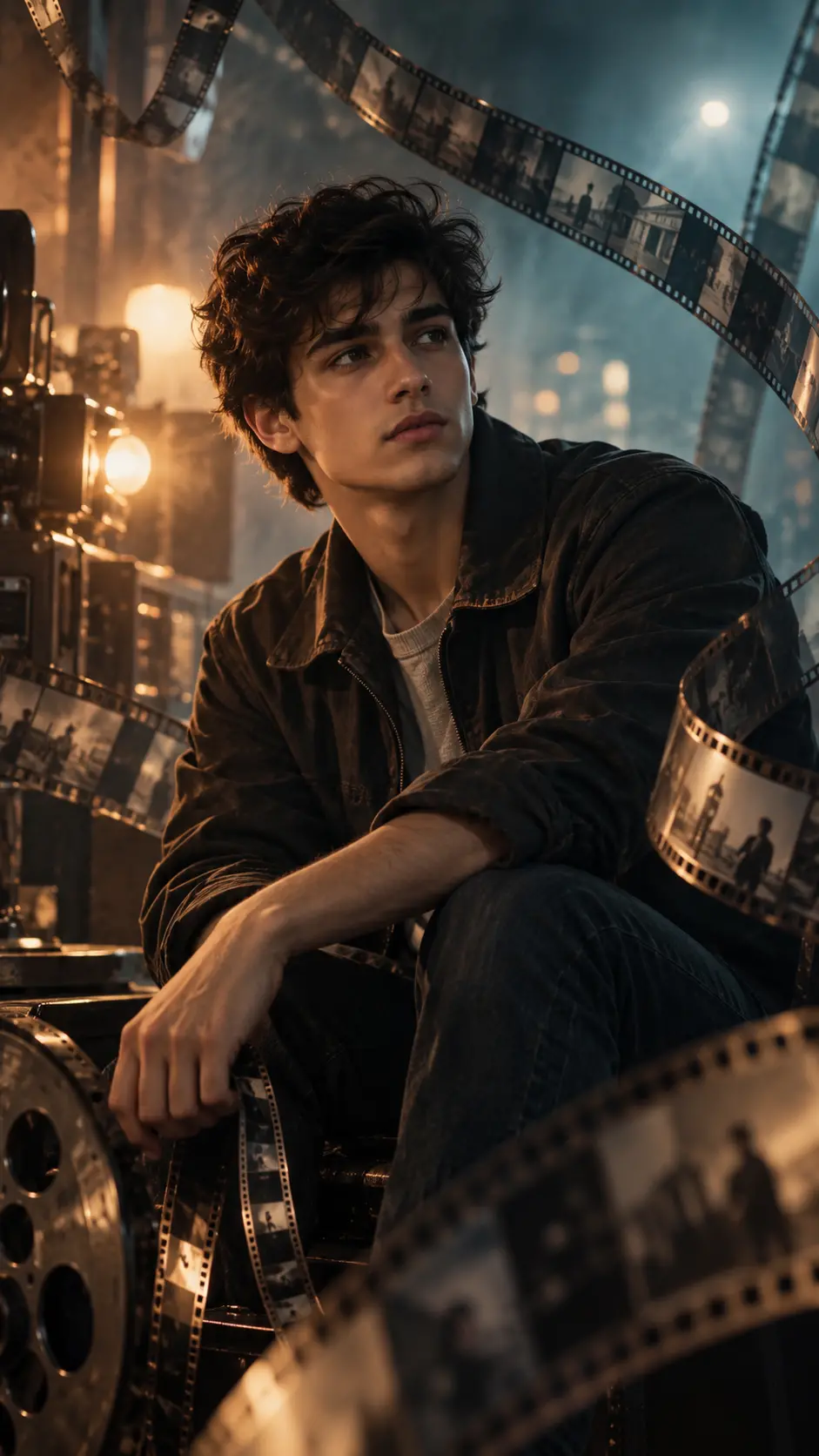
Cinematic Portrait of Young Man with Vintage 35mm Film Strips
Copy Prompt
Copy the full prompt text to use it anywhere you like.
Copy was blocked by your browser. Select the prompt text below and copy it manually.
Choose image aspect ratio
Selected:Original keeps the saved wording. Choosing a ratio edits the copied text; also set the output size in your image tool.
Copy was blocked by your browser. Select the prompt text below and copy it manually.
Prompt guide
How to use this AI image prompt
Overview
Cinematic Boy Film Strip Portrait is a detailed AI image prompt for turning a reference photo into a photorealistic, movie-inspired editorial portrait. The concept places one young adult man in a dark projection room or vintage editing studio, surrounded by curling 35mm film strips, a metallic reel, and classic filmmaking equipment. Warm amber highlights and cool teal-blue fill lighting create the familiar contrast of premium cinematic color grading.
The prompt prioritizes recognizable facial identity, realistic anatomy, natural skin texture, and accurate hands. Its seated, forward-leaning pose and thoughtful expression support an introspective story about memory, cinema, and nostalgia. Layered film strips in the foreground, midground, and background add movement without taking attention away from the face.
This can be used as a ChatGPT image prompt, Gemini image prompt, or general AI image prompt when the selected tool accepts a reference image. It is especially useful when a standard portrait feels too plain and you want a more immersive promotional or storytelling aesthetic.
Best Use Cases
This prompt is well suited to personal cinematic portraits, actor-style publicity images, filmmaker profile pictures, social media posters, vertical cover art, and creative portfolio pieces. The 9:16 composition also makes it practical for mobile wallpapers, Stories, Reels covers, and short-film promotional graphics.
It is a strong choice for photographers, actors, directors, editors, film students, content creators, and anyone interested in nostalgic movie imagery. As a Gemini photo prompt or AI photo editing prompt, it can restyle a clear portrait while retaining the subject’s defining facial structure, hairstyle, skin tone, and overall appearance.
The emotional direction works best for projects involving memories, storytelling, personal history, classic cinema, or behind-the-scenes filmmaking. Minimal clothing and accessories keep the result timeless rather than tied to a specific fashion trend.
How to Customize This Prompt
Start with a clear, well-lit reference photo in which the face is large enough to show the eyes, nose, lips, jawline, hair, and skin texture. Then adjust only the creative details that support your intended use.
- Change the expression from thoughtful to quietly confident, melancholic, or hopeful while keeping it natural.
- Replace the charcoal jacket with another understated dark garment, but preserve the simple styling if facial identity should remain the focus.
- Choose a projection room for stronger atmosphere, an editing studio for an archival feeling, or a backstage setting for a more industrial result.
- Adjust how many film strips appear. Fewer strips create a cleaner portrait; more strips create greater movement and visual depth.
- Specify what appears inside the tiny film frames, such as city silhouettes, architecture, or abstract nostalgic moments. Avoid readable lettering.
- Increase amber light for a warmer vintage mood, or strengthen teal fill for a cooler modern thriller aesthetic.
- Change the crop to head-and-shoulders for a profile image, while retaining the original knees-up framing for a poster-like composition.
When adapting this into a shorter ChatGPT image prompt, preserve the identity instructions, lighting direction, film-strip placement, realistic anatomy requirements, and 9:16 format before removing secondary environmental details.
Tips for Better Results
Identity preservation depends heavily on reference quality. Use a sharp image with natural facial proportions and avoid references obscured by sunglasses, heavy filters, extreme shadows, or hair across the face. Only use a portrait you have permission to edit.
- Keep the face well exposed even though the room is dark. Moody lighting should shape the subject, not hide recognizable features.
- Ask for sharp eyes and gradually softer foreground and background strips. This helps reproduce the shallow depth of field associated with an 85mm portrait lens.
- Keep film strips away from the eyes, nose, and mouth. Foreground strips can be blurred, but they should frame rather than cover the subject.
- If hands render poorly, simplify their action. A relaxed hand near the knee is often more reliable than fingers gripping a tightly curled strip.
- Retain negative instructions for duplicate people, extra fingers, crossed eyes, floating objects, malformed strips, text, logos, and watermarks.
- Generate several variations because film-strip paths, hand anatomy, facial resemblance, and reflections may differ between outputs.
- Use restrained grain and haze. Excessive effects can reduce skin detail, muddy the eyes, and weaken the modern photorealistic finish.
For a Gemini image prompt or other reference-based workflow, compare each result with the source face before choosing the most dramatic composition. Prioritize resemblance and anatomy first, then refine color grading and background complexity.
What to Expect
A successful result should resemble a premium vertical film poster or editorial portrait. The young man remains the unmistakable focal point, with clear facial detail, realistic skin pores, fine hair, textured clothing, and a calm expression. Curving translucent film strips should create layered depth, while warm light passing through them adds golden highlights and nostalgic visual interest.
Expect deep charcoal shadows, smoky blues, muted browns, amber rim lighting, creamy bokeh, subtle grain, and softly visible vintage equipment. The finished image should feel mysterious and reflective rather than action-oriented.
Results will vary by model, reference-photo quality, and image-generation settings. Some tools may simplify tiny film frames, reel reflections, fingers, or complex strip geometry. Iterative adjustments usually work better than adding more detail at once: first secure facial resemblance, then improve pose, lighting, props, and atmospheric effects.